Kaiser uses Epic, the software behind MyChart, but members sign on at kp.org or in the Kaiser Permanente app. Some regions show MyChart screens inside kp.org, but there is no separate Kaiser MyChart account to create.
The Short Answer: Epic Inside, kp.org Outside
If you searched for Kaiser MyChart, you are not wrong to expect it. Kaiser Permanente runs its clinical records on Epic, the same company many hospitals use for their MyChart portal. The difference is the front door. Kaiser members do not create a separate hospital-branded MyChart account. They sign on at kp.org or in the Kaiser Permanente app, and Kaiser’s own member experience sits on top of the Epic record.
In some regions, parts of that experience now look and behave like MyChart. Kaiser’s Mid-Atlantic records page, for example, tells members to open the My Record section in MyChart and to track records requests in MyChart, yet those pages live inside kp.org. So the practical answer is simple: use kp.org or the Kaiser Permanente app with your kp.org sign-on. That account holds your Kaiser records and is what outside apps connect to.
What kp.org and the Kaiser Permanente App Do
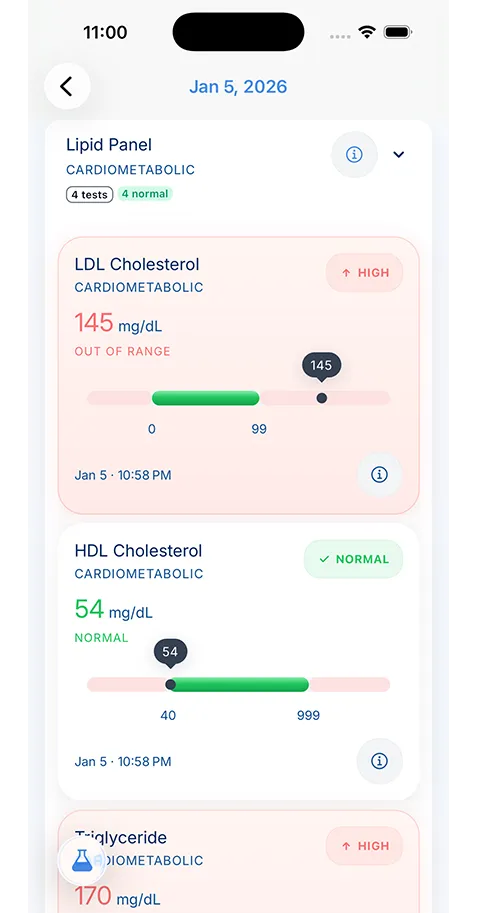
kp.org and the Kaiser Permanente app are two views of the same member account. You can use either to message your care team, schedule appointments, refill prescriptions, and see test results, visit summaries, and your health summary. For records, both lead to the same places: the downloadable health summary, the immunization record, past visit information, and the online medical records request.
A few tasks work better on a computer. Kaiser Northwest, for example, tells members not to use the mobile app when they need to download and print certain forms, and to use kp.org in a web browser instead. If you are gathering documents to share, a browser on a computer is usually the easiest way to save PDFs where you can find them. For everyday checking of results or messages, the app is quicker. Whichever you use, the records come from the same regional account.
Why “Kaiser MyChart” Searches Happen
Several things drive people to search for Kaiser MyChart. Friends and family who use other health systems talk about MyChart, so it becomes the generic word for a patient portal. Some Kaiser pages now use MyChart names and screens inside kp.org. And when people switch from a MyChart hospital to Kaiser, or the other way around, they expect the same kind of account.
The confusion matters because it can send people to the wrong sign-in page. A MyChart login for another hospital, even a nearby one, will not show Kaiser records. If you have care at both Kaiser and an outside hospital, you will have two separate accounts: kp.org for Kaiser, and that hospital’s MyChart for its records. Our guide to how Epic MyChart connections work explains the hospital side, and the KeepMD vs MyChart comparison covers what a portal does and does not do.
Your Records Live in Your Region’s Account
The other key idea is that Kaiser records live by region. Northern California, Southern California, Colorado, Georgia, Hawaii, the Mid-Atlantic States, the Northwest, and Washington State each keep their own member accounts and their own records offices. Kaiser also publishes clinical data connections for outside apps by region.
Epic inside, kp.org outside
Same record, four ways in
There is no separate hospital-branded MyChart account. Kaiser's member experience sits on top of its Epic record, and each door is for a different job.
-
Kaiser Permanente app
Quick daily tasks
- Check a new result
- Reply to your doctor
- Refill a prescription
-
kp.org in a browser
Documents and orders
- Download and save the health summary
- Order a detailed copy of your records
- Complete forms
-
Your region's records office
Requests the portal cannot take
- Records for someone else
- Older records and image copies
- Records after you leave Kaiser
-
An outside app you choose
One private place
- Kaiser records beside other providers' records
- A copy that stays on your device
- Imported through Kaiser's consent process
Start with the region. That one detail decides which account, which records office and which connection holds the history.
If you have always been a member of one region, this is invisible. If you have moved between regions, it explains why an old visit is missing: it lives in the other region’s account. The fix is to request records from the region where the care happened, or to connect each region separately in an app that supports it. The Kaiser Permanente regions guide shows which region covers which states, including the two easy mix-ups: Washington, D.C. belongs to the Mid-Atlantic region, and Vancouver, Washington belongs to the Northwest.
How Outside Apps Connect to Kaiser Records
Federal patient access rules let you direct your health information to an app you choose, and Kaiser supports this for its clinical records. Kaiser’s third-party app privacy page explains that, through an app you choose, you can request that your Kaiser data be imported through the app’s consent process. It also warns that HIPAA does not cover many third-party apps and suggests questions to ask about how an app stores, uses, and shares your data.
In practice, a connection works like this. You choose your Kaiser region in the app, the app sends you to Kaiser’s own sign-on page for that region, and you approve what the app may access. You enter your kp.org password on Kaiser’s page, not in the app. The app then receives the clinical records Kaiser makes available through that regional connection. It is read-only access to a copy: the app cannot change your Kaiser chart, and Kaiser remains the source of truth.
Family Members and Proxy Access

Proxy access: one sign-on, another member’s account, rules by age and state.
Families often manage several Kaiser accounts at once: a child, a teen, an aging parent. Kaiser’s tools handle this with proxy access, which lets an authorized adult view another member’s account from their own sign-on instead of sharing passwords. Rules differ by age and by state. Washington State, for example, gives minors control over certain sensitive records, so a parent’s view of a teen’s account can be limited, and Kaiser’s regional forms ask for documentation when someone signs on behalf of another person.
Proxy access is also the right way to think about outside apps. If you want a parent’s Kaiser records organized in an app, authorize the connection through Kaiser’s sign-on and consent steps, not by entering their kp.org password elsewhere. When a parent cannot manage this themselves, ask Kaiser about the proxy or authorization route for your region first. That keeps the account secure and makes sure the records you collect are ones you are allowed to hold.
Where KeepMD Fits Next to the Kaiser App
KeepMD is not a replacement for kp.org or the Kaiser Permanente app. You still need Kaiser’s tools to message your doctors, book visits, and refill prescriptions. KeepMD is a private personal health record that keeps copies of your records on your device so that you can bring Kaiser records together with records from other doctors, hospitals, and labs.
With the regional Kaiser Permanente clinical records connection, KeepMD organizes the clinical records Kaiser shares, such as results, medications, allergies, immunizations, conditions, and documents. It does not import health plan claims, and it imports imaging reports rather than image files. Kaiser decides what is available through the connection, so check kp.org or request records for anything missing. KeepMD is independent of Kaiser Permanente and Epic and is not affiliated with or endorsed by either.
Quick Guide: Which Tool for Which Job
Use the Kaiser Permanente app for quick daily tasks: checking a new result, replying to your doctor, or refilling a prescription. Use kp.org in a web browser when you need to download and save documents, order a detailed copy of your records, or complete forms. Use your region’s records office when you need records for someone else, older records, image copies, or records after you leave Kaiser.
Use an outside app such as KeepMD when you want your Kaiser records in one private place alongside records from other providers, or when you want a copy that stays on your device. Whichever you use, start by confirming your region, because that single detail decides which account, which records office, and which connection holds the history you are looking for. To see how KeepMD compares with MyChart, Apple Health, and other options, read our best medical records app comparison.
Kaiser pages cited in this guide: Records, forms and certifications, Maryland, Virginia, and Washington, D.C..