
Hospital integration guide

Cedars-Sinai Cedars-Sinai · mycslink.cedars-sinai.org

Connect Cedars-Sinai medical records to KeepMD

Connect Cedars-Sinai through My CS-Link to organize available health records in KeepMD. This guide also covers portal access, formal record requests, and current Cedars-Sinai phone and fax options.

Available to connect Connection status reviewed on

KeepMD is an independent personal health record app. It is not affiliated with, endorsed by, or operated by Cedars-Sinai or Epic Systems Corporation. MyChart® is a trademark of Epic Systems Corporation.

Example screen
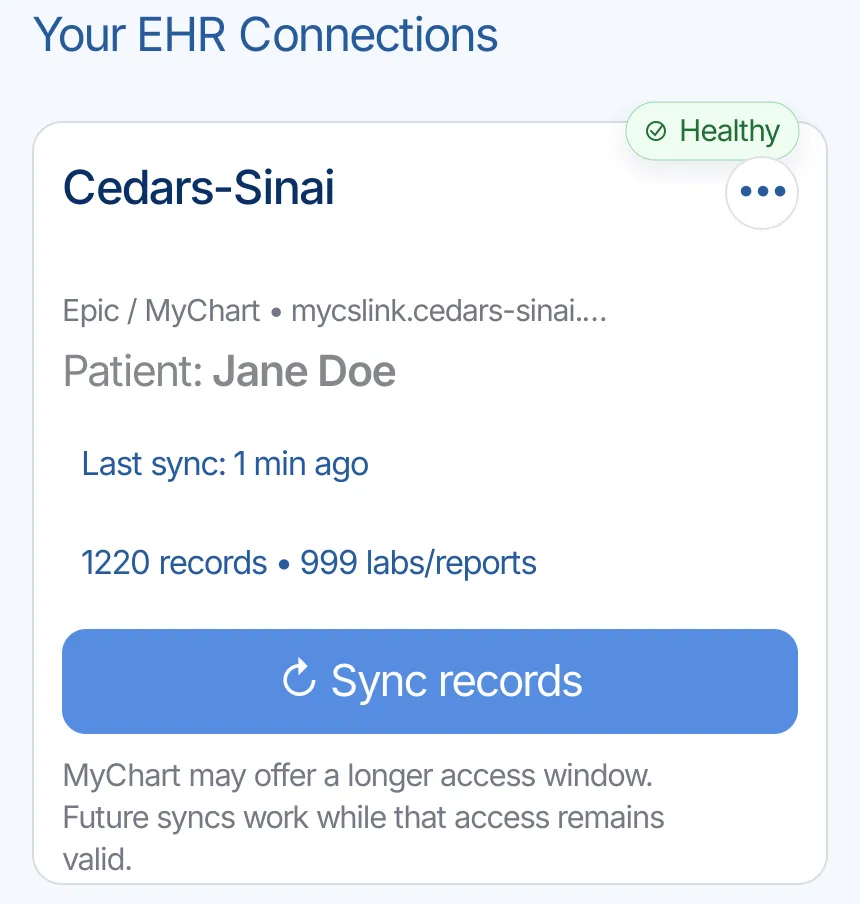
Healthy Cedars-Sinai connection in KeepMD with a recent sync and Sync records control
Cedars-Sinai records organized in KeepMD
Patient portal My CS-Link Official Cedars-Sinai portal
Platform Epic MyChart Patient access
Service area Los Angeles, California Cedars-Sinai health system
KeepMD status Ready to connect Availability can vary by account
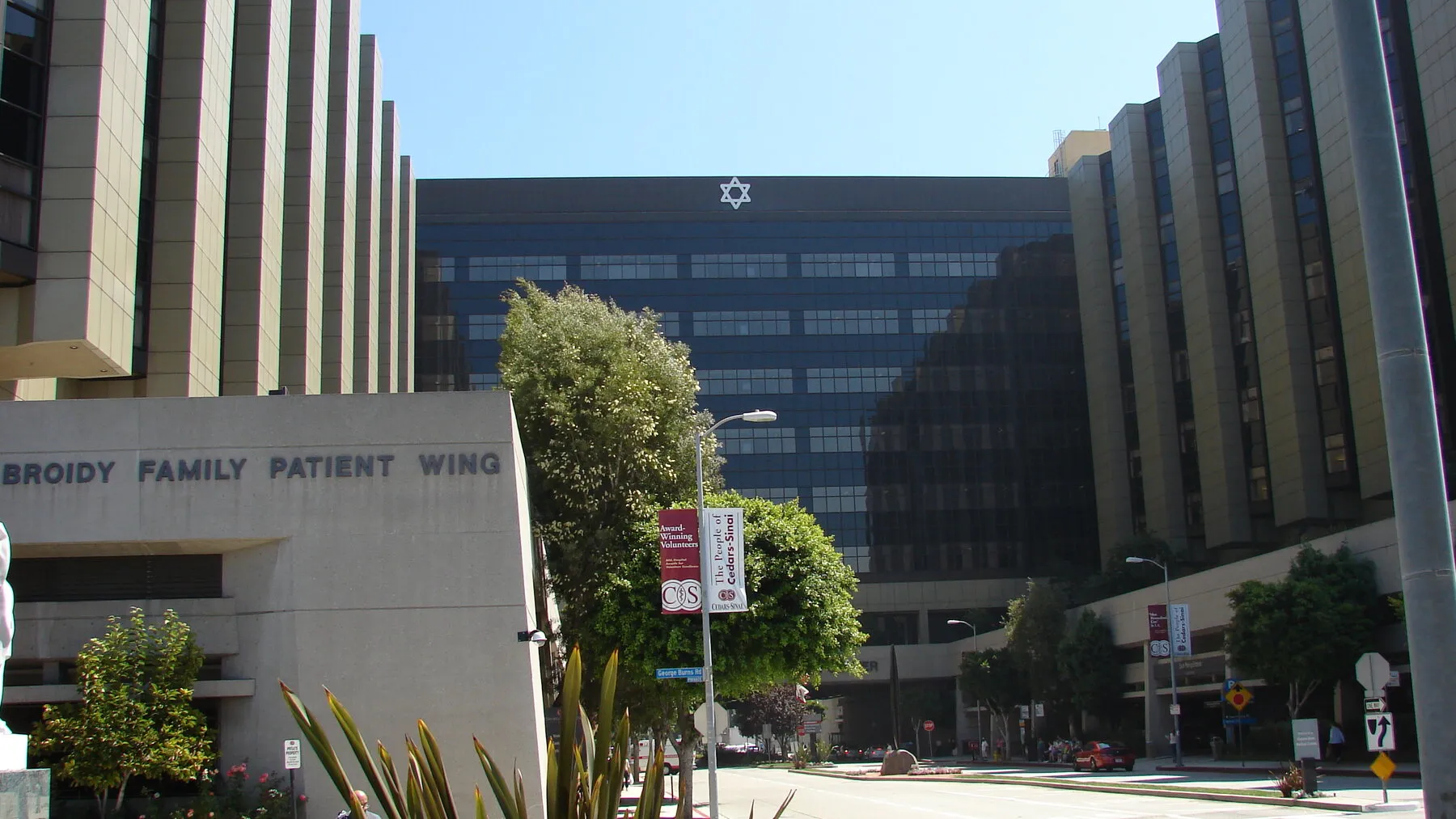
Campus Cedars-Sinai Medical Center 8700 Beverly Boulevard, Los Angeles, CA 90048 · Map

How the Cedars-Sinai connection works

My CS-Link is Cedars-Sinai's patient portal. Cedars-Sinai says patients can use it to access health information such as medications, allergies, and test results. Its web version also provides a route for requesting a formal copy and downloading released records as a PDF.

Cedars-Sinai is ready to connect in KeepMD. Search for Cedars-Sinai, continue to the provider-owned My CS-Link sign-in page, review access, and import the health information available for your account. Cedars-Sinai's own third-party-app instructions confirm that patients of Epic providers can connect apps to retrieve parts of their health record.

If a record is not available through the connection, use My CS-Link or Cedars-Sinai's official medical-records request process below.

What KeepMD has verified for Cedars-Sinai

Cedars-Sinai states that third-party apps can retrieve parts of a patient's Epic health record. The categories available in KeepMD depend on what Cedars-Sinai authorizes and returns for the account.

Verified for import

4 types

Record categories KeepMD can organize from Cedars-Sinai through the patient-access connection.

  • Lab results
    Cedars-Sinai lists lab results among the health information third-party apps can retrieve.
  • Medications (prescriptions)
    Cedars-Sinai lists medications among the health information third-party apps can retrieve.
  • Allergies and intolerances
    Cedars-Sinai lists allergies among the health information third-party apps can retrieve.
  • Immunizations
    Cedars-Sinai lists immunization history among the health information third-party apps can retrieve.

Not yet verified

1 type

These may exist in the portal, but KeepMD has not verified their availability through this connection.

  • Other health information
    KeepMD organizes additional categories when Cedars-Sinai authorizes and returns them for the account.

Usually a separate request

2 types

Records Cedars-Sinai typically releases through its medical-records process, not through the patient-access connection.

  • Complete or certified medical record
    Use Cedars-Sinai's formal records process when you need the designated record set or a released copy.
  • Imaging files and other material absent from the portal
    Use the authorization form or contact the Health Information Department for anything My CS-Link does not release.

The Cedars-Sinai connection in seven steps

These screens show how a Cedars-Sinai connection moves from provider search and My CS-Link sign-in to record selection, import, and the KeepMD connection summary. KeepMD never needs to display a patient's private information to explain the process.

  1. Step 1 of 7

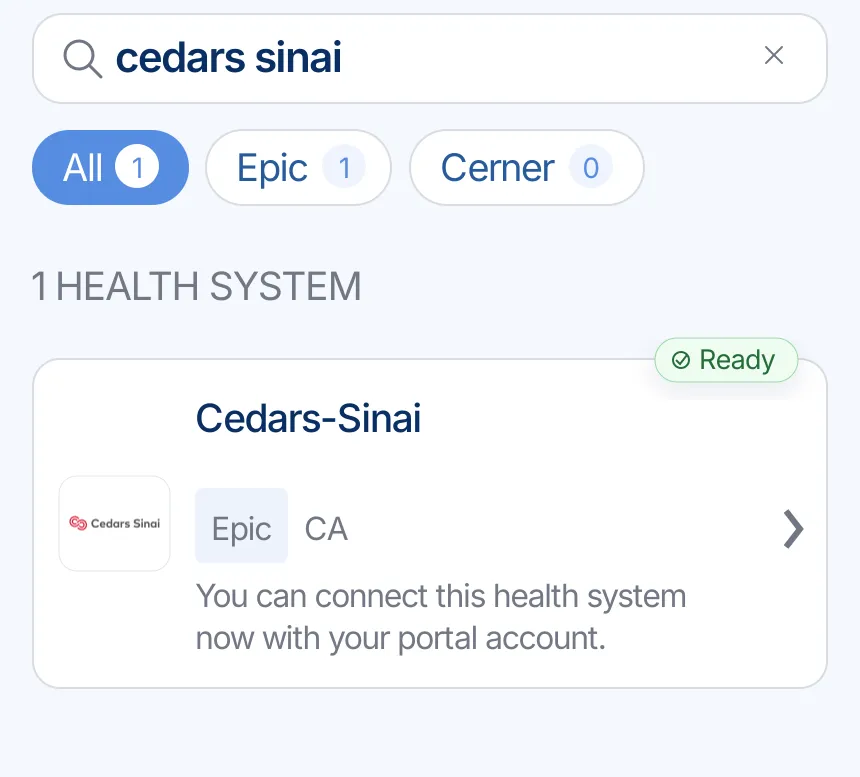
    Find Cedars-Sinai in KeepMD

    Search for Cedars-Sinai in KeepMD and choose the health system from the provider list. KeepMD uses the Cedars-Sinai identity and My CS-Link endpoint for the connection.

    KeepMD search results showing Cedars-Sinai ready to connect
    Cedars-Sinai in KeepMD's hospital search.
  2. Step 2 of 7

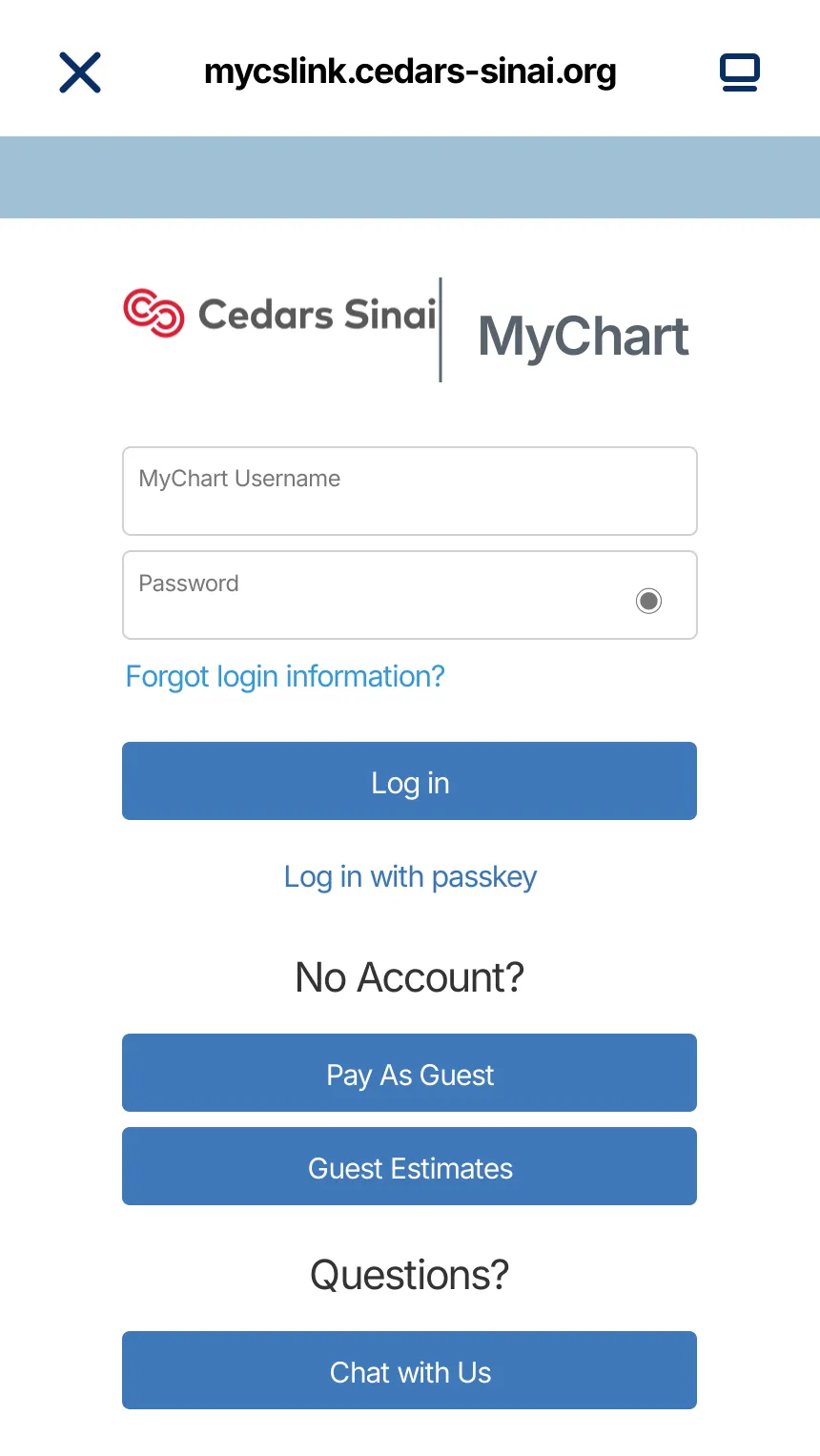
    Continue to My CS-Link

    KeepMD opens the provider-owned My CS-Link sign-in page. Enter your portal credentials there; KeepMD does not receive or store your portal password.

    My CS-Link sign-in handoff for the Cedars-Sinai connection
    My CS-Link sign-in opened from KeepMD.
  3. Step 3 of 7

    Review access

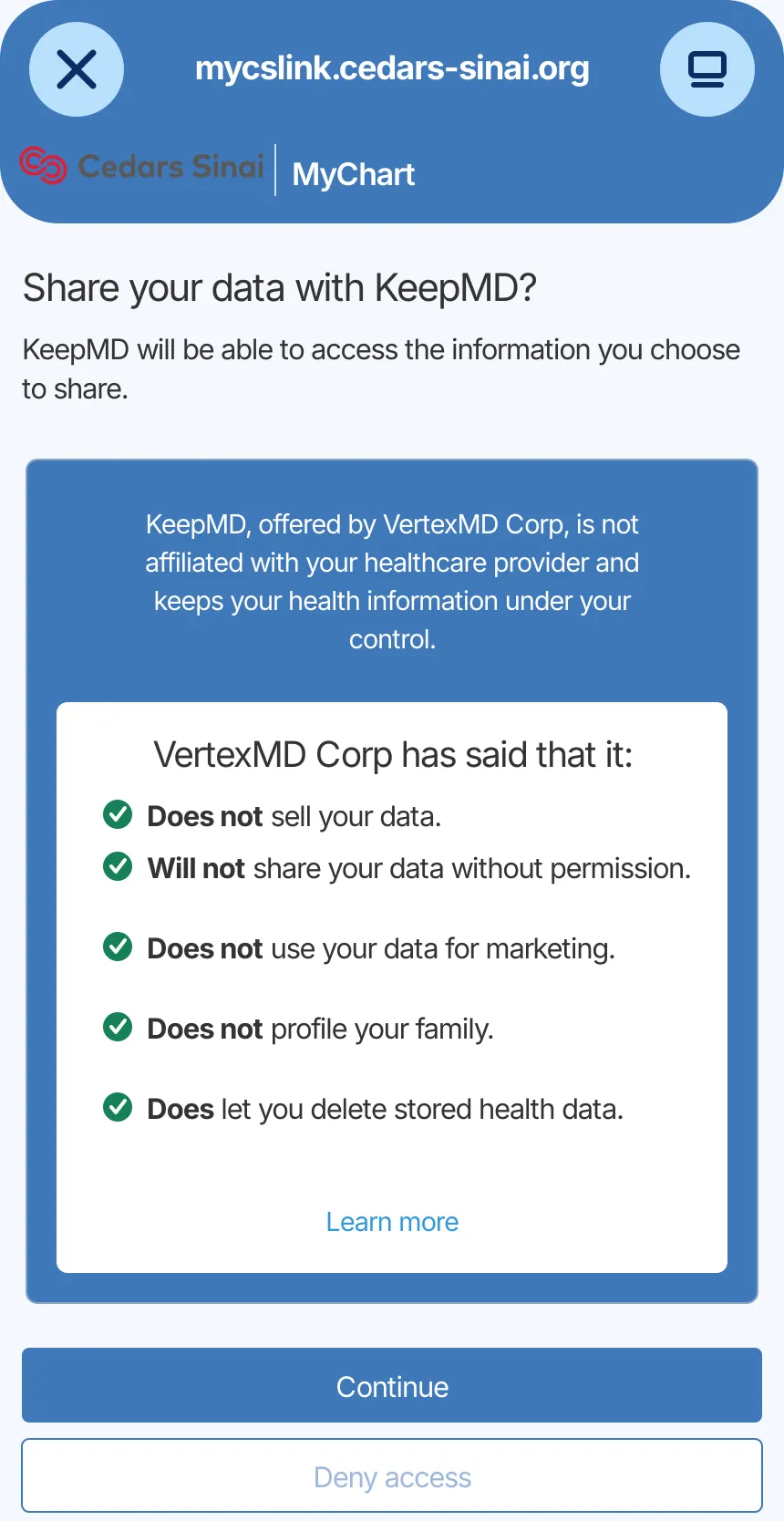
    Review how KeepMD will access your health information, then decide whether to continue. Cedars-Sinai says linked-app access can be reviewed and removed from My CS-Link.

    KeepMD data-sharing consent screen for the Cedars-Sinai connection
    The sharing review during the Cedars-Sinai connection.
  4. Step 4 of 7

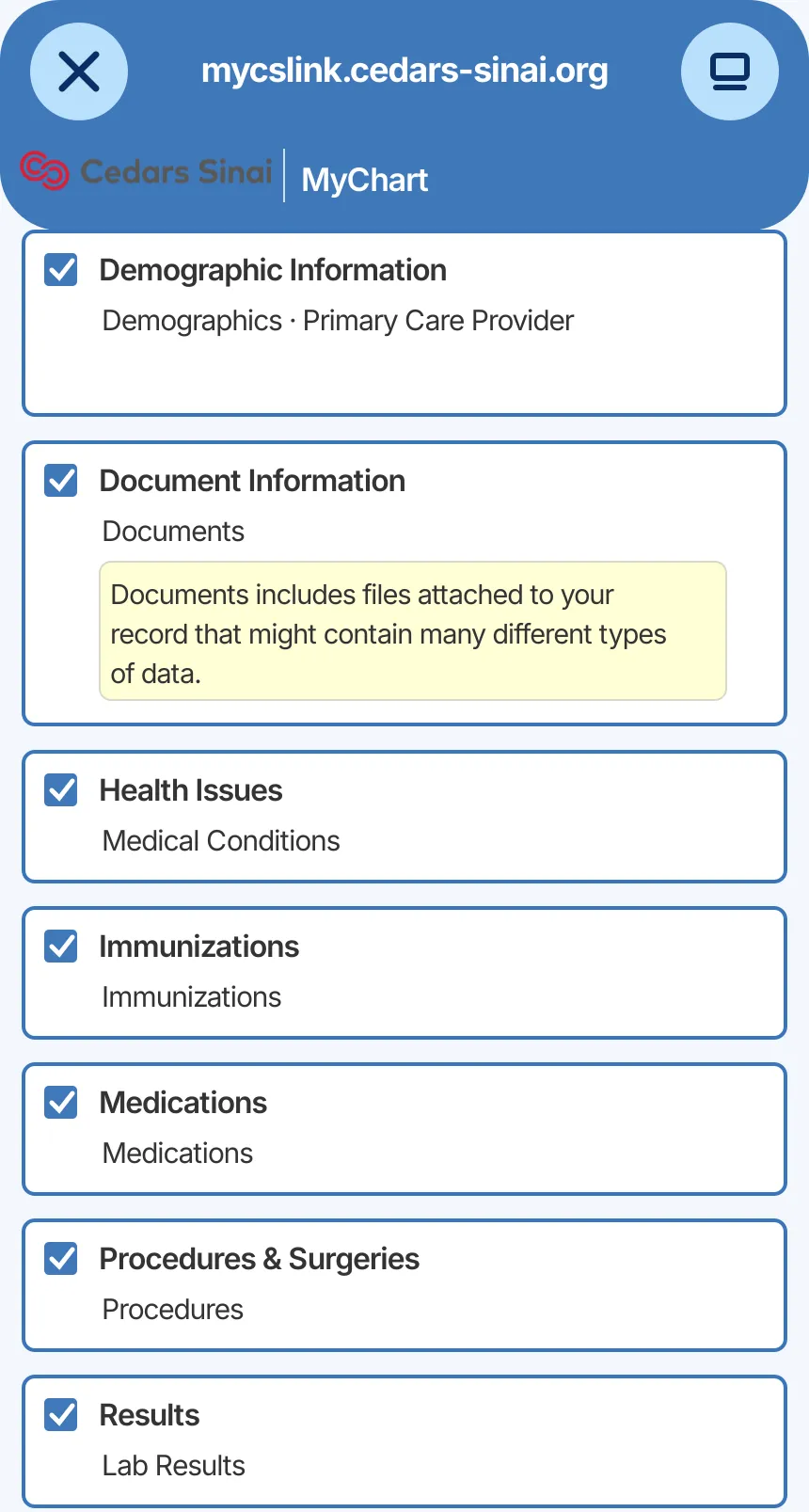
    Choose what to share

    Select the health information you want to bring into KeepMD. Available categories depend on the data Cedars-Sinai authorizes and returns for your account.

    Epic MyChart record categories available to choose for the Cedars-Sinai connection
    Health-information categories selected for the connection.
  5. Step 5 of 7

    Import available records

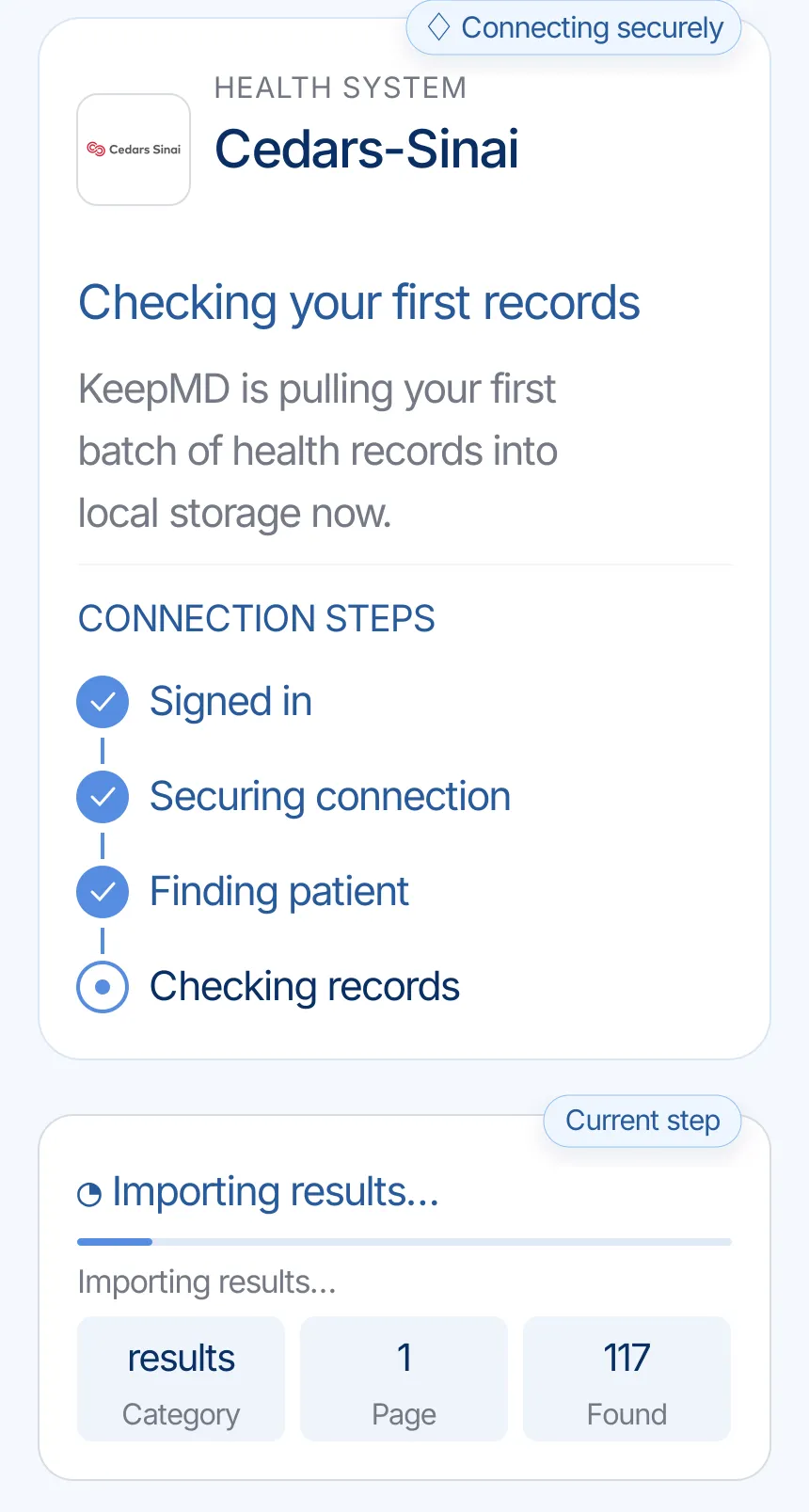
    KeepMD secures the connection, identifies the patient record, and checks the health information available to import.

    KeepMD checking the first records from Cedars-Sinai
    KeepMD checking the records available through Cedars-Sinai.
  6. Step 6 of 7

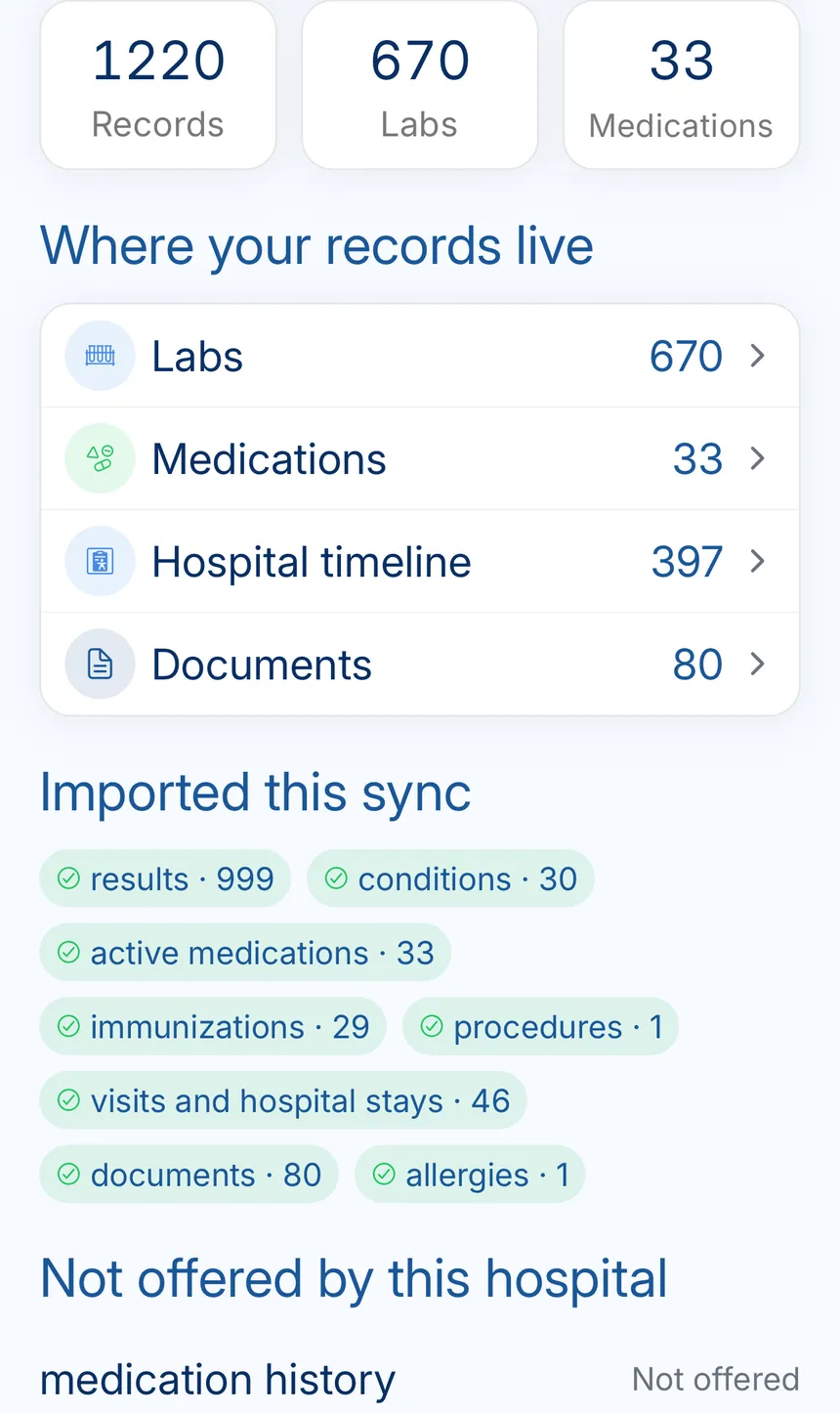
    Review the import result

    When the import finishes, KeepMD shows the records it organized. Record totals and categories vary according to the patient's Cedars-Sinai chart and the information returned through the connection.

    KeepMD record summary showing organized labs, medications, timeline events, and documents
    The completed Cedars-Sinai import result in KeepMD.
  7. Step 7 of 7

    See the Cedars-Sinai connection summary

    The connection summary keeps Cedars-Sinai records together and shows when they were last updated. The mix of labs, medications, timeline events, and documents depends on the account.

    Healthy Cedars-Sinai connection in KeepMD with a recent sync and Sync records control
    Cedars-Sinai health records organized in KeepMD.

Know the hospital behind the portal

Cedars-Sinai's official main-campus profile, current brand channels, and licensed campus photography.

Facility profile

Organization type
Nonprofit academic medical center
Main campus
8700 Beverly Boulevard, Los Angeles
Licensed beds
886
Physicians
2,100
Nurses
2,800

Cedars-Sinai Medical Center official campus profile 2026-07-17

Institutes and specialties

  • Smidt Heart Institute
  • Cedars-Sinai Cancer
  • Guerin Children's
  • Neurology and Neurosurgery
  • Orthopaedics
  • Women's Health

Cedars-Sinai's official profiles

Cedars-Sinai medical records: portal, request, phone, and fax

Everything the connection does not cover: identifying the right organization, portal downloads, formal requests, privacy, and the post-import check.

Make sure you are using the official My CS-Link portal

Health system
Cedars-Sinai
Patient portal
Cedars-Sinai (mycslink.cedars-sinai.org)
Platform
Epic MyChart
Also appears as
  • Cedars Sinai
  • Cedars-Sinai Medical Center
  • Cedars-Sinai Health System
  • My CS-Link

Cedars-Sinai calls its patient portal My CS-Link. The official login is hosted under mycslink.cedars-sinai.org. Check that address before entering credentials, especially if you reached the page from search results or an email.

My CS-Link runs on Epic MyChart technology, but the Cedars-Sinai name and My CS-Link branding are the useful identifiers for patients. KeepMD is an independent personal health record app and does not operate the portal.

What you can do in My CS-Link today

Cedars-Sinai's official FAQ describes My CS-Link as secure online access to medical records and health information, including medications, allergies, and test results. The official medical-records guide says the web version of My CS-Link can also start a formal records request. When the copy is released, the portal provides a PDF download.

Use that official export when you need a released copy or when a record is not available through the connection. A PDF can still be kept with your other records in KeepMD through the app's document tools.

Using more than one patient portal? See how KeepMD and MyChart work together

Cedars-Sinai medical records phone and fax options

For a formal Cedars-Sinai medical records request, older material, imaging, or anything the portal does not show, use the My CS-Link request route or the Health Information Department instructions on Cedars-Sinai's current authorization form.

My CS-Link web Start a medical-records request Use the web portal route described on Cedars-Sinai's medical-records request page, then download the released PDF.
Authorization form Signed use-or-disclosure request Download Cedars-Sinai's official authorization PDF, complete it, and follow the delivery instructions printed on the current form.
Cedars-Sinai Medical Center phone 310-423-2259 The current Cedars-Sinai authorization form lists this Health Information Department phone number for Cedars-Sinai Medical Center.
Cedars-Sinai Medical Center fax 310-423-0113 The current Cedars-Sinai authorization form lists this fax number for Cedars-Sinai Medical Center. Confirm that you selected the correct facility before sending health information.

Need help preparing the request? Follow the medical-records request checklist

How KeepMD protects the connection

My CS-Link handles your Cedars-Sinai username and password. KeepMD receives the access you approve, imports the health information Cedars-Sinai returns, and stores imported records on your device by default.

You can review or remove linked-app access from My CS-Link. KeepMD is independent from Cedars-Sinai and Epic and does not operate the My CS-Link portal.

Keeping copies of your health information? Read about private medical-record storage

What to do after connecting Cedars-Sinai

Review the imported date ranges, facility names, and categories. If something is missing, refresh the connection and check My CS-Link before using Cedars-Sinai's formal records-request route.

KeepMD will treat the Cedars-Sinai Epic connection as available while monitoring endpoint health and user feedback. If a patient reports a connection failure, KeepMD can investigate the affected account flow without exposing that patient's records.

Still waiting for a missing record? Understand your medical-record access rights

Known Cedars-Sinai quirks worth checking

KeepMD reaches My CS-Link, but you cannot complete sign-in

Confirm that you can sign in directly at the official My CS-Link website first. Account recovery and portal access are managed by Cedars-Sinai; its My CS-Link Patient Support Line is 855-891-7251.


Your account shows a different record count

Record totals and categories vary by patient, facility, date range, and the information Cedars-Sinai makes available through the connection. Use the formal request route for anything missing.

You need records that are not available through the connection

Use the My CS-Link web request or Cedars-Sinai's authorization form. The formal request route remains useful for certified copies, imaging, older material, or other records that do not appear.

FAQ

Cedars-Sinai records questions

Sources

Browse all hospital connection guides