Hospital integration guide

Kaiser Permanente Southern California Kaiser Permanente - Southern California · kp.org

Connect Kaiser Permanente Southern California records to KeepMD

Request records at kp.org, reach the Release of Information office for your area, and organize your Southern California Kaiser records in KeepMD.

Available to connect Connection status reviewed on

KeepMD is an independent personal health record app. It is not affiliated with, endorsed by, or operated by Kaiser Permanente Southern California or Epic Systems Corporation. MyChart® is a trademark of Epic Systems Corporation.
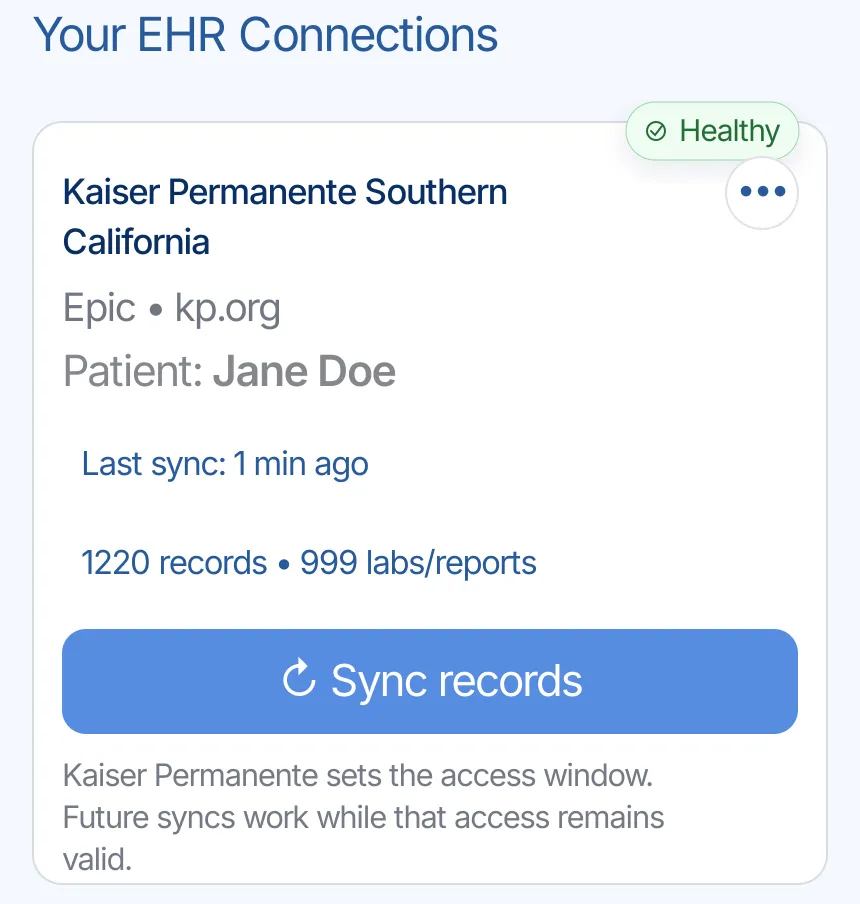
Example screen
Healthy Kaiser Permanente Southern California connection in KeepMD with a recent sync and Sync records control
Southern California Kaiser records organized in KeepMD
Member portal kp.org and the Kaiser Permanente app Southern California region
Platform Epic Regional patient access
Scale 16 hospitals, 5 million members Kaiser fast facts, June 30, 2026
Records help 13 area ROI offices Release of Information
Campus Kaiser Permanente Los Angeles Medical Center 4867 Sunset Boulevard, Los Angeles, CA 90027 · Map
Campus Kaiser Permanente San Diego Medical Center (Zion) 4647 Zion Avenue, San Diego, CA 92120 · Map

How the Southern California Kaiser connection works

KeepMD connects to Kaiser Permanente Southern California through the region's kp.org member sign-on, using a regional Kaiser Permanente clinical records connection built on Epic. Choose Southern California in KeepMD, sign on with your kp.org user ID, and approve access to organize the clinical records Kaiser makes visible to your account. For a detailed copy, use kp.org's medical records request. If records have not arrived within 5 business days, or you are asking as a proxy or caregiver, contact the Release of Information (ROI) office for your area.

One regional account

Your Southern California kp.org account is the connection. You do not choose a single medical center.

Five-day follow-up rule

Kaiser says to contact your area ROI office if records have not arrived within 5 business days.

Corrections are separate

To change something in your chart, use Kaiser's amendment request, not a new import.

Which Kaiser Permanente Southern California records can you bring together?

Use these categories to check a Southern California connection. What arrives depends on what Kaiser makes visible to your kp.org account through the regional connection.

10 categories to check

10 types

Use this checklist for an Epic connection. Available content depends on your account; listing a category does not confirm that records in it have been imported.

  • Lab results
    Blood work and other laboratory results. Check the collection date, units, and reference range when comparing tests from different visits.
  • Vital signs
    Measurements such as blood pressure, pulse, height, and weight. Look at the visit date so an older measurement is not mistaken for a current one.
  • Medications (prescriptions)
    Prescription records may include current and past orders. A prescription entry does not establish what you take today; discuss discrepancies with your care team.
  • Allergies and intolerances
    Recorded allergies, intolerances, and reactions. An empty list does not confirm that you have no allergies; compare it with information you have given your clinician.
  • Immunizations
    Vaccinations documented in the chart. Doses given at a pharmacy, school, or another health system may need to be obtained from that source.
  • Health conditions and problems
    Diagnoses and entries on the problem list. Some entries describe past care; ask the treating team about an unfamiliar or incorrect entry.
  • Procedures
    Documented procedures and treatment history. For the details of an operation, look for the operative report as well as the procedure entry.
  • Visits and encounters
    Office visits, emergency visits, and hospital stays. Compare the facility and dates with your own appointment or discharge paperwork.
  • Clinical documents and notes
    Released clinical notes, visit summaries, and other documents. Availability can differ by document and date; request a missing note by visit and clinician.
  • Diagnostic reports
    Written findings from imaging or other diagnostic tests. The report explains the findings; the actual scan images may follow a separate download or request process.

Not yet verified

3 types

These may exist in the portal, but KeepMD has not verified their availability through this connection.

  • Disability and leave paperwork
    SDI, FMLA, and pregnancy leave certifications are separate requests handled by ROI, not clinical records.
  • Care-team messages
    Secure messages stay in kp.org. Keep any you need there.
  • Emergency care outside Kaiser
    An outside emergency room keeps its own record. Kaiser may hold only a transfer or claims summary.

Usually a separate request

2 types

Records Kaiser Permanente Southern California typically releases through its medical-records process, not through the patient-access connection.

  • Diagnostic image files
    Kaiser's California authorization form treats diagnostic images as a separate category. KeepMD imports reports and narratives, not DICOM image files.
  • Pharmacy and medical billing
    Copay summaries and billing information come from kp.org's cost pages, not the clinical records connection.

The Southern California Kaiser connection in seven steps

Walk through an example connection for Kaiser Permanente Southern California, from KeepMD's provider search to the kp.org sign-on and the import summary. Pick Southern California only if that is where your kp.org account is. The record totals in the screens are examples.

  1. Step 1 of 7

    Choose Southern California

    Search for Kaiser in KeepMD and pick Kaiser Permanente Southern California, the region that holds your kp.org account.
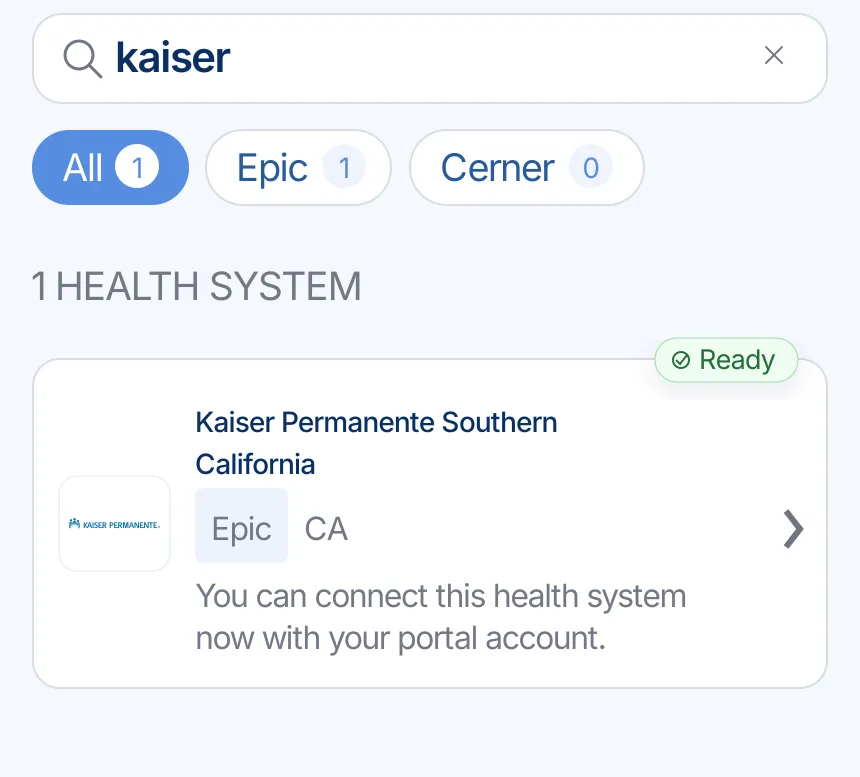
    KeepMD search results showing Kaiser Permanente Southern California ready to connect
    Kaiser Permanente Southern California in KeepMD provider search.
  2. Step 2 of 7

    Sign on at kp.org

    KeepMD opens Kaiser's own sign-on page. Enter your kp.org user ID there; KeepMD never receives or stores your password.
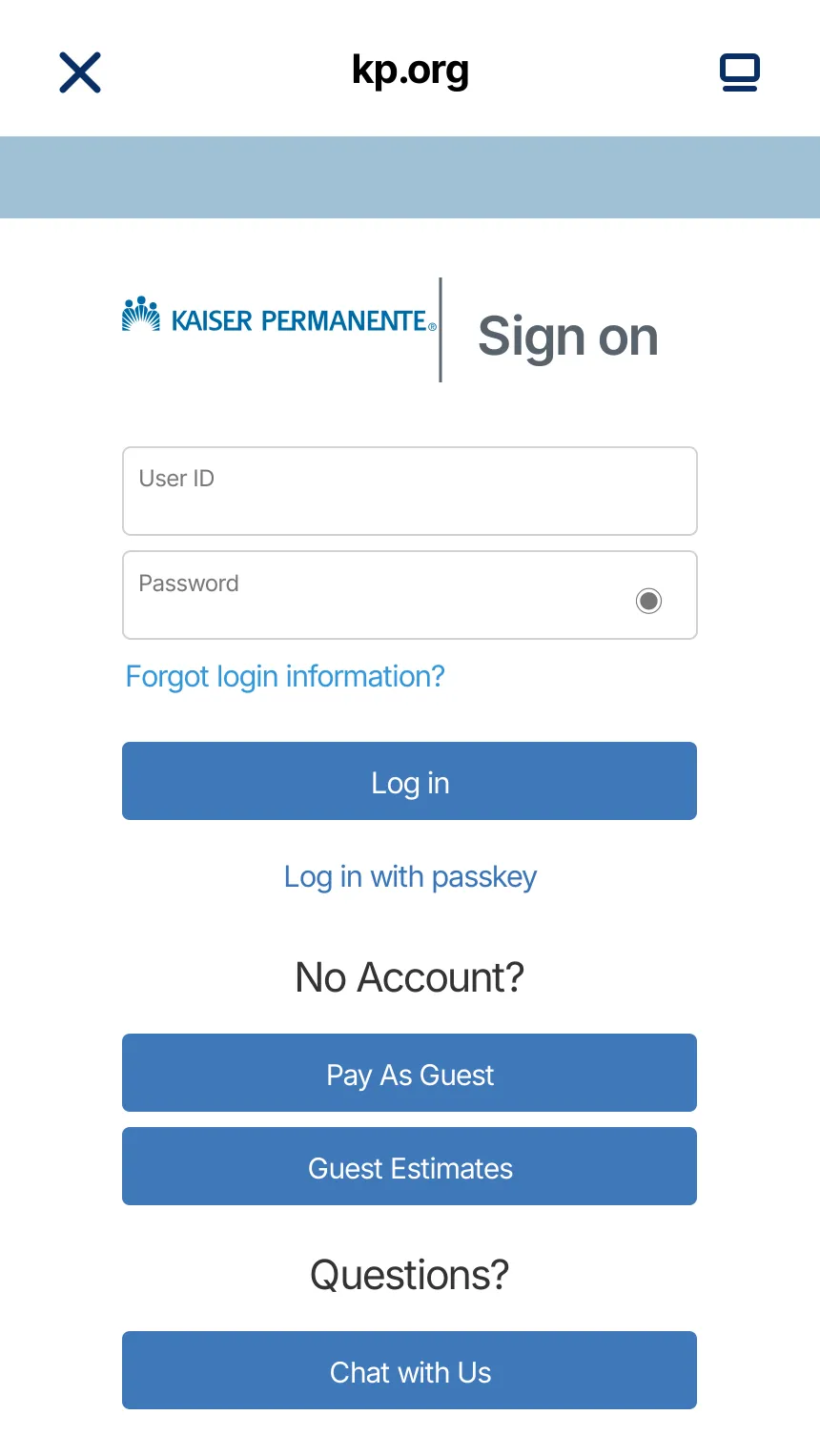
    kp.org member sign-in sign-in handoff for the Kaiser Permanente Southern California connection
    Secure handoff to the kp.org sign-on page.
  3. Step 3 of 7

    Review access

    Read what Kaiser will share and decide whether to allow the connection.
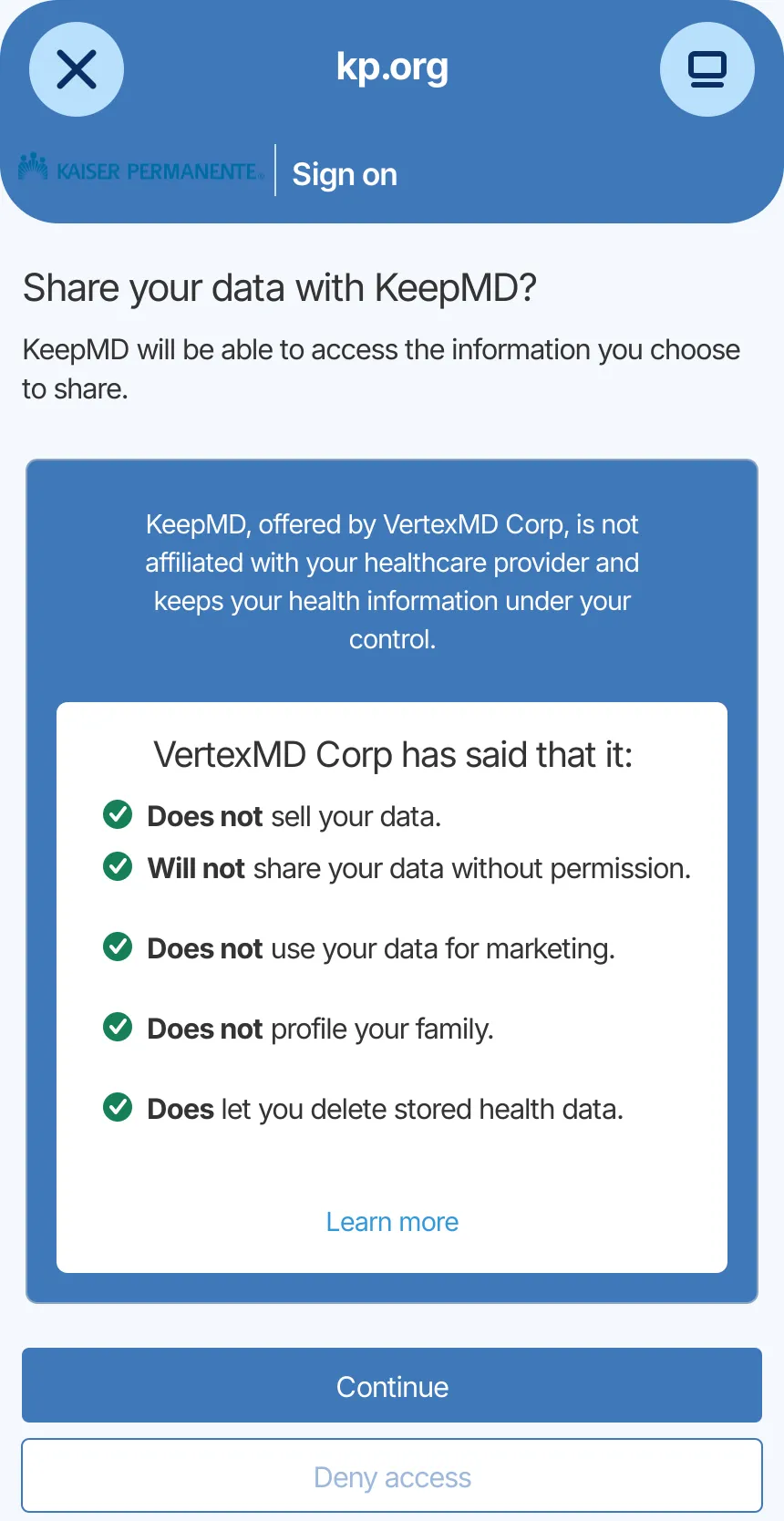
    KeepMD data-sharing consent screen for the Kaiser Permanente Southern California connection
    Access review for the regional Kaiser connection.
  4. Step 4 of 7

    Choose record categories

    Select the categories you want to organize. Availability depends on your account.
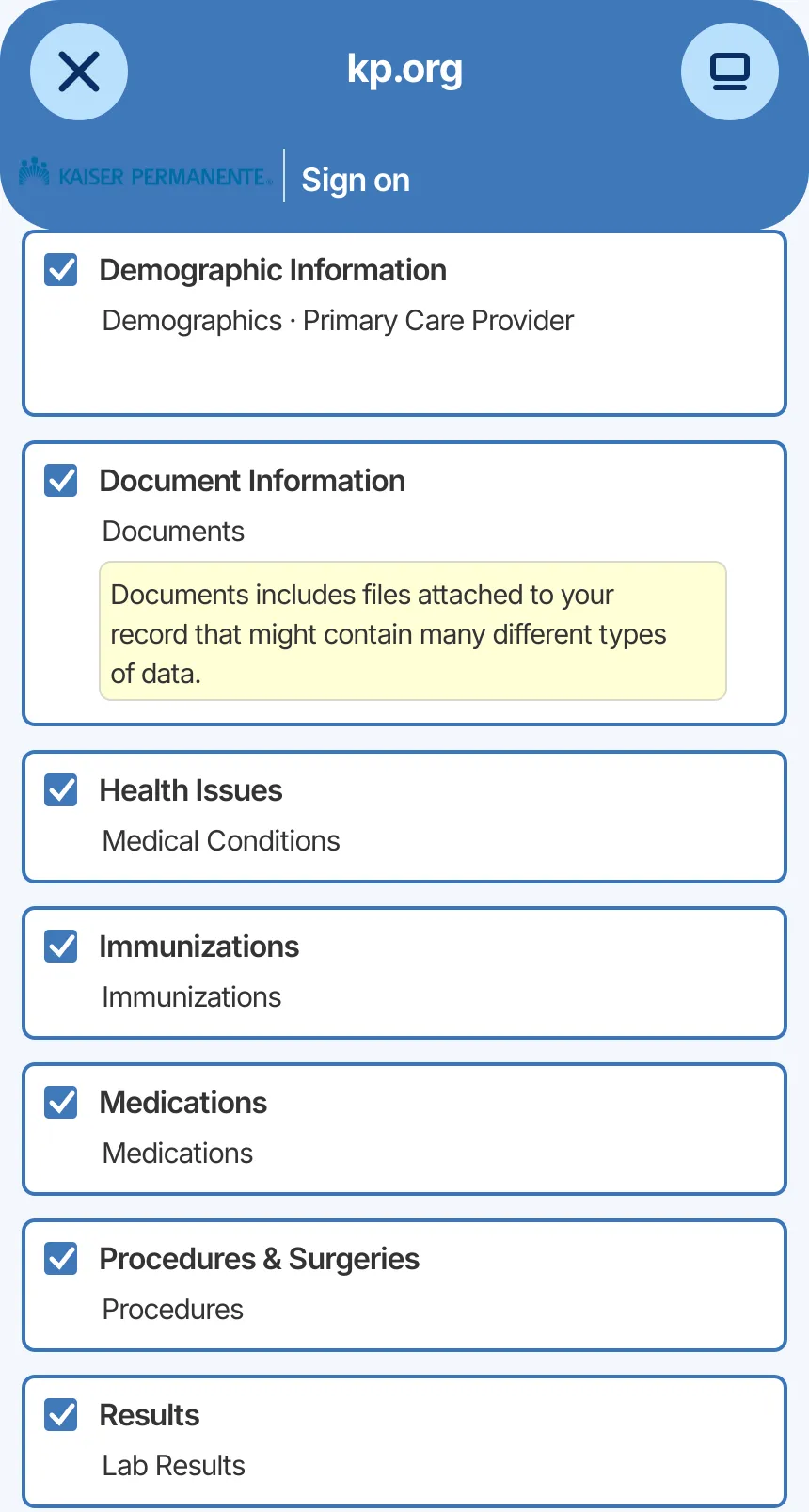
    Kaiser Permanente (Epic) record categories available to choose for the Kaiser Permanente Southern California connection
    Record categories selected for import.
  5. Step 5 of 7

    Import available records

    KeepMD secures the connection and reads the clinical records Kaiser makes available.
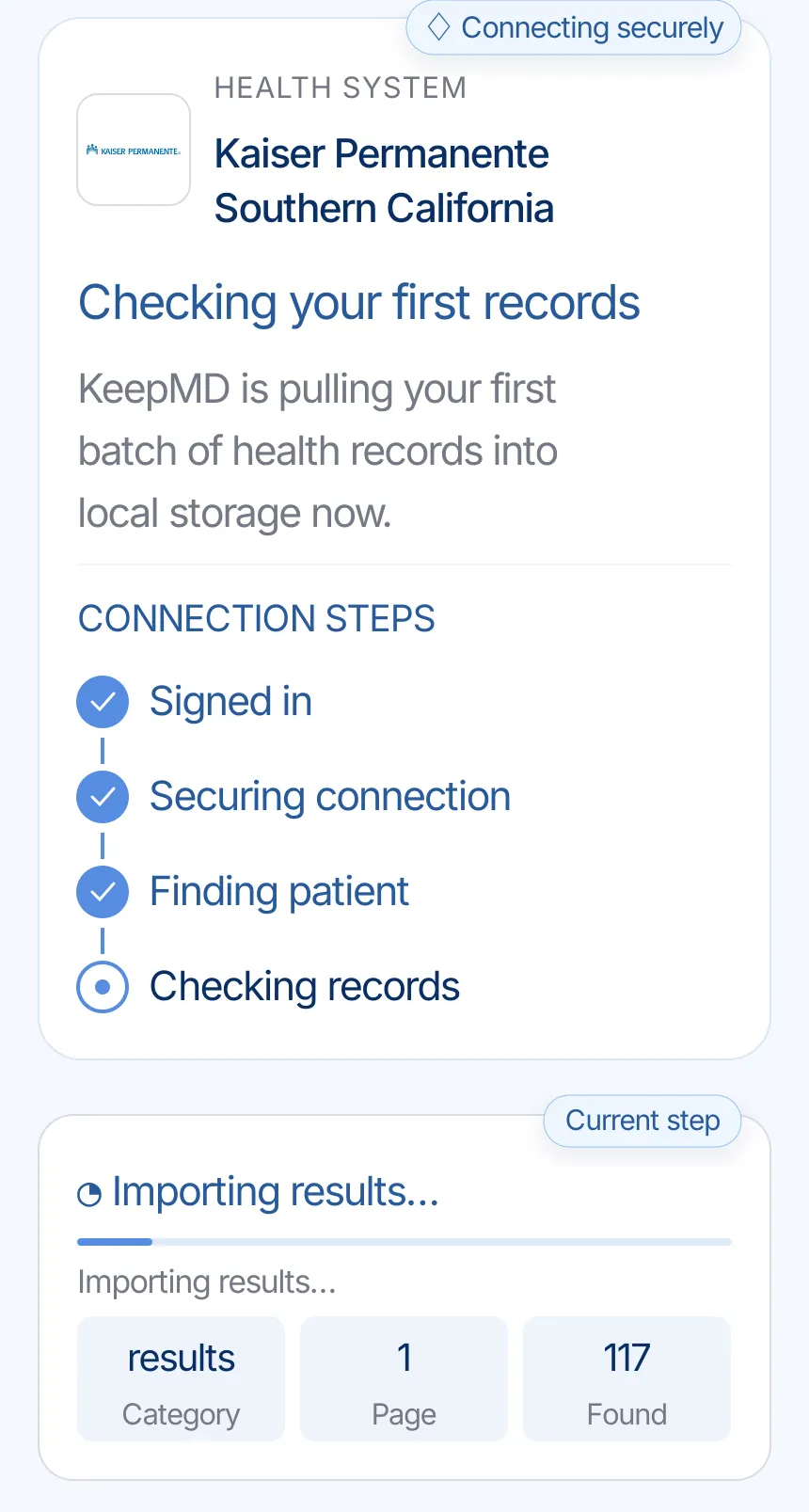
    KeepMD checking the first records from Kaiser Permanente Southern California
    KeepMD checking available records.
  6. Step 6 of 7

    Review organized records

    KeepMD groups what the connection returns. Categories and totals vary by member.
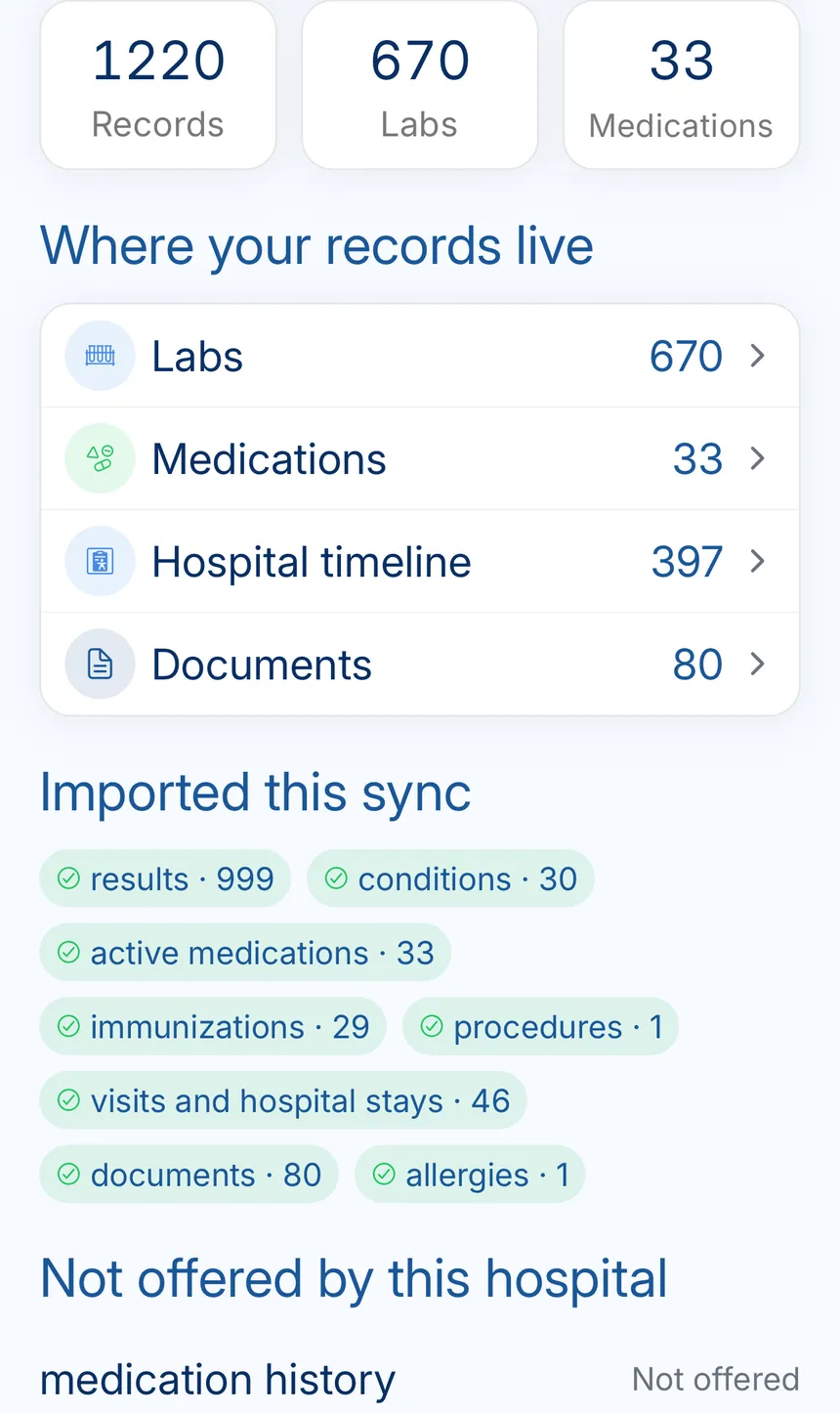
    KeepMD record summary showing organized labs, medications, timeline events, and documents
    Kaiser records organized in KeepMD.
  7. Step 7 of 7

    See the connection summary

    The summary keeps the region, last update, and organized categories together.

    Healthy Kaiser Permanente Southern California connection in KeepMD with a recent sync and Sync records control
    Kaiser Permanente Southern California connection summary in KeepMD.

Know the hospital behind the portal

Two Southern California medical centers at opposite ends of the region. The full hospital list, grouped by Release of Information office, follows below.

Facility profile

Members
5 million (June 30, 2026)
Hospitals
16
Medical offices
201
Medical group
Southern California Permanente Medical Group
Local markets
Coachella Valley, Kern County, Inland Empire, Metro Los Angeles and West Los Angeles, Orange County, San Diego County, Tri-Central Area, West Ventura and Valleys

Kaiser Permanente fast facts, Southern California 2026-09-26

Kaiser Southern California official pages

Kaiser hospitals and medical centers in Southern California

These medical centers belong to Kaiser Permanente Southern California, so their records roll up to your Southern California kp.org account and one regional connection covers them. Each group shows the Release of Information (ROI) office Kaiser lists for that area, with its phone number.

Los Angeles ROI · 213-580-6135

  • Los Angeles Medical Center Los Angeles (Sunset Boulevard)

West Los Angeles ROI · 323-857-2695

  • West Los Angeles Medical Center Los Angeles (Cadillac Avenue)

South Bay ROI · 310-517-2905

  • South Bay Medical Center Harbor City

Downey ROI · 562-658-3140

  • Downey Medical Center Downey

Baldwin Park ROI · 626-939-7120

  • Baldwin Park Medical Center Baldwin Park

Panorama City ROI · 818-375-2208

  • Panorama City Medical Center Panorama City

Woodland Hills ROI · 818-719-2670

  • Woodland Hills Medical Center Woodland Hills

Orange County ROI · 714-284-6634

  • Anaheim Medical Center Anaheim
  • Irvine Medical Center Irvine

San Bernardino County ROI · 909-609-3200

  • Fontana Medical Center Fontana
  • Ontario Medical Center Ontario

Riverside ROI · 951-353-4470

  • Riverside Medical Center Riverside
  • Moreno Valley Medical Center Moreno Valley

San Diego ROI · 619-583-4293

  • San Diego Medical Center (Zion) San Diego
  • San Diego Medical Center (San Marcos) San Marcos

Medical offices without a Kaiser hospital

  • Antelope Valley ROI 661-726-2129
  • Kern County ROI 661-852-3450

ROI phone numbers come from Kaiser's Southern California records page, and each office also lists an email address there. Licensed hospitals are cross-checked against the CMS Hospital General Information file, where some campuses share one license. Confirm which office serves your campus on kp.org before sending anything. TTY 711 is available.

Kaiser Southern California records page and CMS hospital data 2026-09-26

Kaiser Southern California medical records: kp.org, ROI offices, and requests

Everything the connection does not cover: identifying the right organization, portal downloads, formal requests, privacy, and the post-import check.

Kaiser Permanente Southern California is the region; kp.org is where you sign on

Health system
Kaiser Permanente Southern California
Patient portal
Kaiser Permanente - Southern California (kp.org)
Platform
Epic, through kp.org and the Kaiser Permanente app
Also appears as
  • Kaiser Permanente Southern California
  • Kaiser Southern California
  • KP Southern California
  • KP SoCal
  • Kaiser SoCal
  • Southern California Permanente Medical Group

Southern California runs on Epic, but members sign on at kp.org or in the Kaiser Permanente app instead of a hospital-branded MyChart website. Records, forms, and certifications are handled by the region's Release of Information (ROI) department.

Confirm you are in the Southern California region

  • Your care is at medical centers such as Los Angeles, Fontana, Riverside, Anaheim, San Diego, or Woodland Hills.
  • Your kp.org records pages show the southern-california region.
  • Your medical group is the Southern California Permanente Medical Group.

Northern California is a separate region with separate records offices. If your history spans both, each region needs its own KeepMD connection and its own request.

Start with kp.org in Southern California

Southern California members can download a health summary from kp.org right away. It covers allergies, immunizations, ongoing conditions, prescriptions, test results, and many procedures, which is often enough for a new doctor.

When you need more than the summary

  1. Use Request your medical record on kp.org to choose documents and dates.
  2. Track the request under My requests.
  3. If nothing has arrived within 5 business days, contact the ROI office for your area.

Kaiser's Southern California page also explains how its ROI department completes disability, leave, and other medical forms. Those are not medical record copies, so request them separately.

Using more than one patient portal? See how KeepMD and MyChart work together

Kaiser Southern California medical records request, phone numbers, and ROI offices

Start online at kp.org. Contact the Release of Information (ROI) office in your area when you are a proxy or caregiver requesting on a member's behalf, or when a request has not arrived within 5 business days.

Make the request easy to fill

  • Name the medical center and the visit or admission dates.
  • List specific documents, such as a discharge summary, operative note, or pathology report.
  • For a third party, use Kaiser's California authorization form. It stays valid for six months.

To correct information in your chart, submit Kaiser's amendment request form rather than a new records request.

Online kp.org medical records request Choose documents and dates; track under My requests.
Area ROI offices 13 offices; see the list above Phone and email for each area on kp.org.
Corrections Medical records amendment request form Ask Kaiser to review and correct an entry.
Hearing or speech TTY 711 Available for ROI calls.

Need help preparing the request? Follow the medical-records request checklist

What to check before authorizing Southern California access

You authorize the connection on Kaiser's kp.org sign-on page. Confirm the member and read the permissions before continuing.

Keep control of your records

  • Recover your kp.org user ID or password through Kaiser; KeepMD cannot reset it.
  • Use Kaiser's proxy process to help a family member instead of their password.
  • Share downloaded records only with people who need them.

Kaiser's third-party app privacy page asks members to check how any app uses and protects health data. KeepMD keeps imported records on your device. Revoking future access does not delete files you have already saved. KeepMD is independent of Kaiser Permanente and Epic.

Keeping copies of your health information? Read about private medical-record storage

What to review after connecting Southern California

Check a recent visit at your usual medical center first, then an older hospital stay if you had one. Look at medications and allergies before your next appointment.

If something is still missing

  1. Look for it in kp.org.
  2. Note the medical center, the date, and the document type.
  3. If kp.org shows it but KeepMD does not, tell KeepMD support without sending passwords or full records.
  4. If kp.org does not show it, request it and follow up with ROI after 5 business days.

If you disagree with an entry, the amendment request is the formal route to ask for a correction.

Still waiting for a missing record? Understand your medical-record access rights

Known Kaiser Permanente Southern California quirks worth checking

Your request is past 5 business days

Call or email the ROI office for your area with the request date and the medical center.

You were seen in both Kaiser California regions

Add connections for both Southern and Northern California. Each region's account shows its own history.

KeepMD shows fewer notes than kp.org

Compare dates in both places. Request any document that is visible in kp.org but missing after a refresh.

You need a correction

Use Kaiser's amendment request form. KeepMD shows what Kaiser sends and cannot edit Kaiser's chart.

FAQ

Kaiser Permanente Southern California records questions

Sources

Browse all hospital connection guides