Hospital integration guide

UCSF Health UCSF · ucsfmychart.ucsfmedicalcenter.org

Your UCSF Health medical records

Use UCSF MyChart, request a copy from Health Information Management Services, get image CDs from the Radiology Imaging Library, and check which site treated you before organizing records in KeepMD.

Available to connect Connection status reviewed on

KeepMD is an independent personal health record app. It is not affiliated with, endorsed by, or operated by UCSF Health or Epic Systems Corporation. MyChart® is a trademark of Epic Systems Corporation.

Portal UCSF MyChart ucsfmychart.ucsfmedicalcenter.org
KeepMD connection UCSF UCSF MyChart route for UCSF Health, UCSF Benioff Children's Hospitals and, since October 4, 2025, Hyde and Stanyan hospitals; MarinHealth links to the portal but lists its own records offices; John Muir Health, Zuckerberg San Francisco General and student health are separate
Records 415-353-2221 Health Information Management Services

Start with the document you need

UCSF MyChart shows most of your UCSF Health record. Request the rest through Sharing Hub in MyChart or by mailing the release form to Health Information Management Services, and ask the Radiology Imaging Library for image CDs. Check whether UCSF Health, MarinHealth or another organization treated you before connecting.

Which UCSF Health records can you bring together?

Use these ten categories to check your connected records. What arrives depends on what the hospital has recorded and shares for your account and dates of care.

10 categories to check

10 types

Use this checklist for an Epic connection. Available content depends on your account; listing a category does not confirm that records in it have been imported.

  • Lab results
    Blood work and other laboratory results. Check the collection date, units, and reference range when comparing tests from different visits.
  • Vital signs
    Measurements such as blood pressure, pulse, height, and weight. Look at the visit date so an older measurement is not mistaken for a current one.
  • Medications (prescriptions)
    Prescription records may include current and past orders. A prescription entry does not establish what you take today; discuss discrepancies with your care team.
  • Allergies and intolerances
    Recorded allergies, intolerances, and reactions. An empty list does not confirm that you have no allergies; compare it with information you have given your clinician.
  • Immunizations
    Vaccinations documented in the chart. Doses given at a pharmacy, school, or another health system may need to be obtained from that source.
  • Health conditions and problems
    Diagnoses and entries on the problem list. Some entries describe past care; ask the treating team about an unfamiliar or incorrect entry.
  • Procedures
    Documented procedures and treatment history. For the details of an operation, look for the operative report as well as the procedure entry.
  • Visits and encounters
    Office visits, emergency visits, and hospital stays. Compare the facility and dates with your own appointment or discharge paperwork.
  • Clinical documents and notes
    Released clinical notes, visit summaries, and other documents. Availability can differ by document and date; request a missing note by visit and clinician.
  • Diagnostic reports
    Written findings from imaging or other diagnostic tests. The report explains the findings; the actual scan images may follow a separate download or request process.

Not yet verified

1 type

These may exist in the portal, but KeepMD has not verified their availability through this connection.

  • Categories available in your account
    UCSF MyChart coverage depends on the patient, encounter and permissions. Compare each category with the portal; this guide does not certify every category as imported.

Usually a separate request

2 types

Records UCSF Health typically releases through its medical-records process, not through the patient-access connection.

  • Images and reports
    The report and the image files are different records. Confirm the imaging location and study date before requesting a copy.
  • Complete chart or certified documents
    Use the formal request route for the correct custodian; a portal view can be partial.

The UCSF Health connection in seven steps

Illustrative walkthrough: find UCSF, confirm the UCSF MyChart portal, and review access before sharing information. The screens and counts are examples, not a record of an import from this hospital.

  1. Step 1 of 7

    Find UCSF

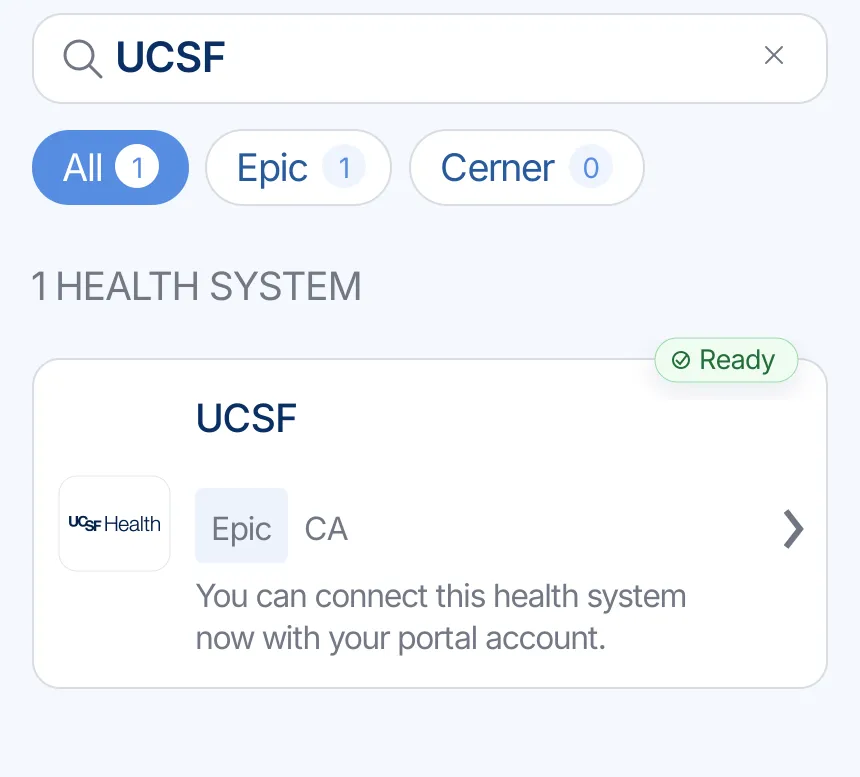
    Search for UCSF in KeepMD. Confirm the portal is ucsfmychart.ucsfmedicalcenter.org and matches the location that treated you.

    Illustrative example: KeepMD search results showing UCSF ready to connect
    Example of provider search in KeepMD.
  2. Step 2 of 7

    Continue to UCSF MyChart

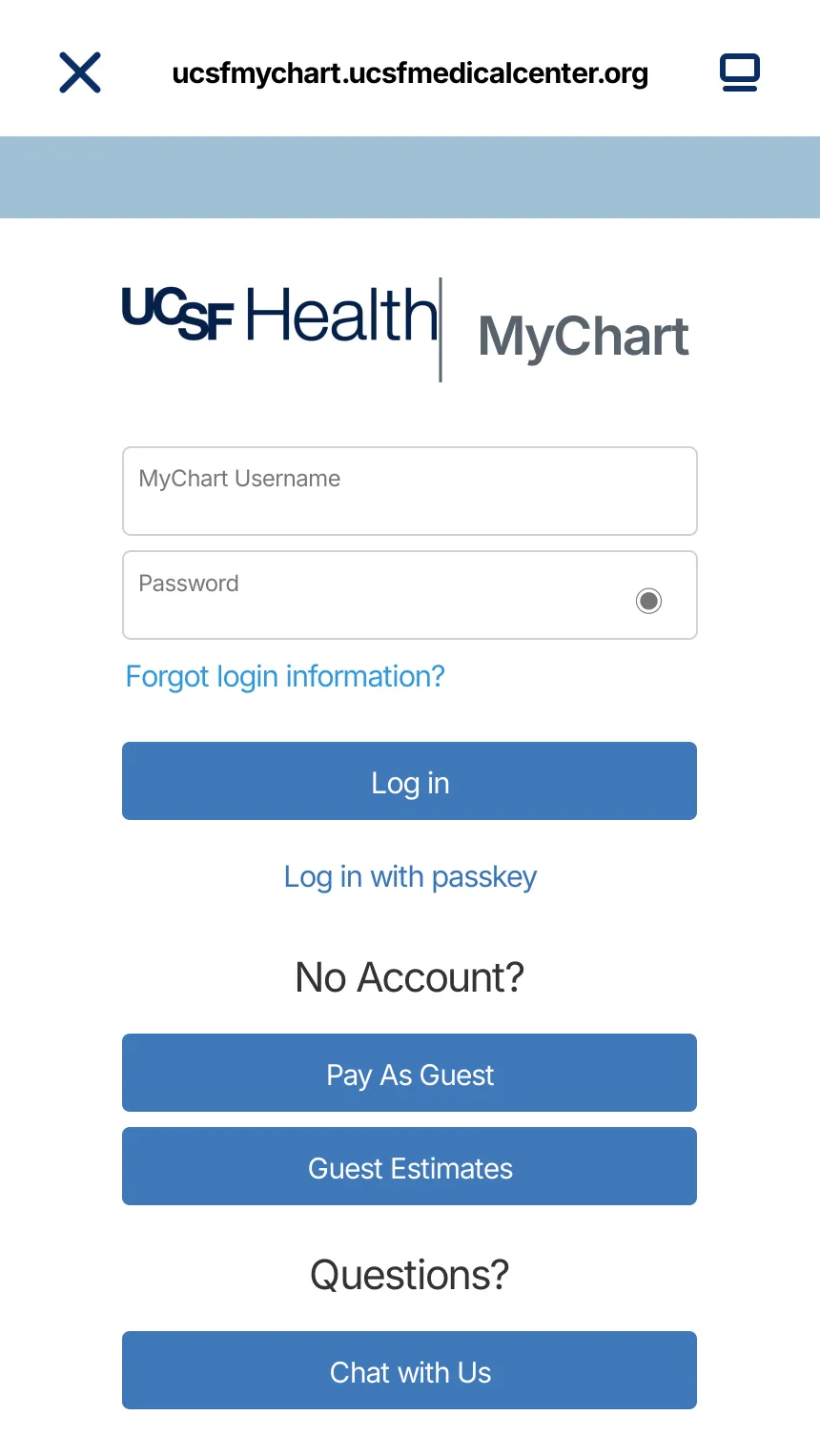
    KeepMD opens the provider-owned sign-in page. Enter credentials there; KeepMD does not receive or store your password.

    Illustrative example: UCSF MyChart sign-in handoff for the UCSF Health connection
    Secure handoff to UCSF MyChart.
  3. Step 3 of 7

    Review access

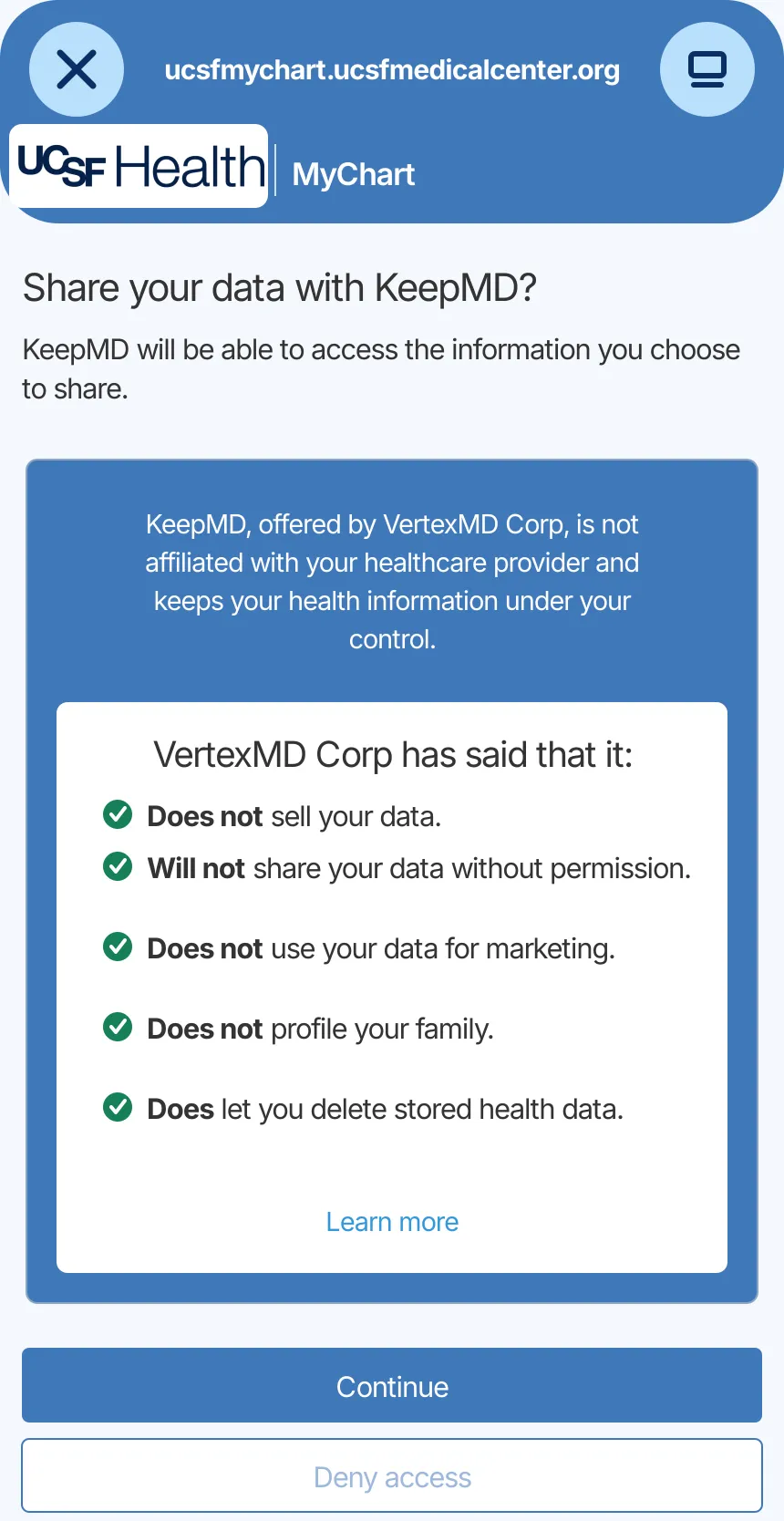
    Review the information the portal can share and decide whether to authorize the connection.

    Illustrative example: KeepMD data-sharing consent screen for the UCSF Health connection
    Access review for the provider connection.
  4. Step 4 of 7

    Choose record categories

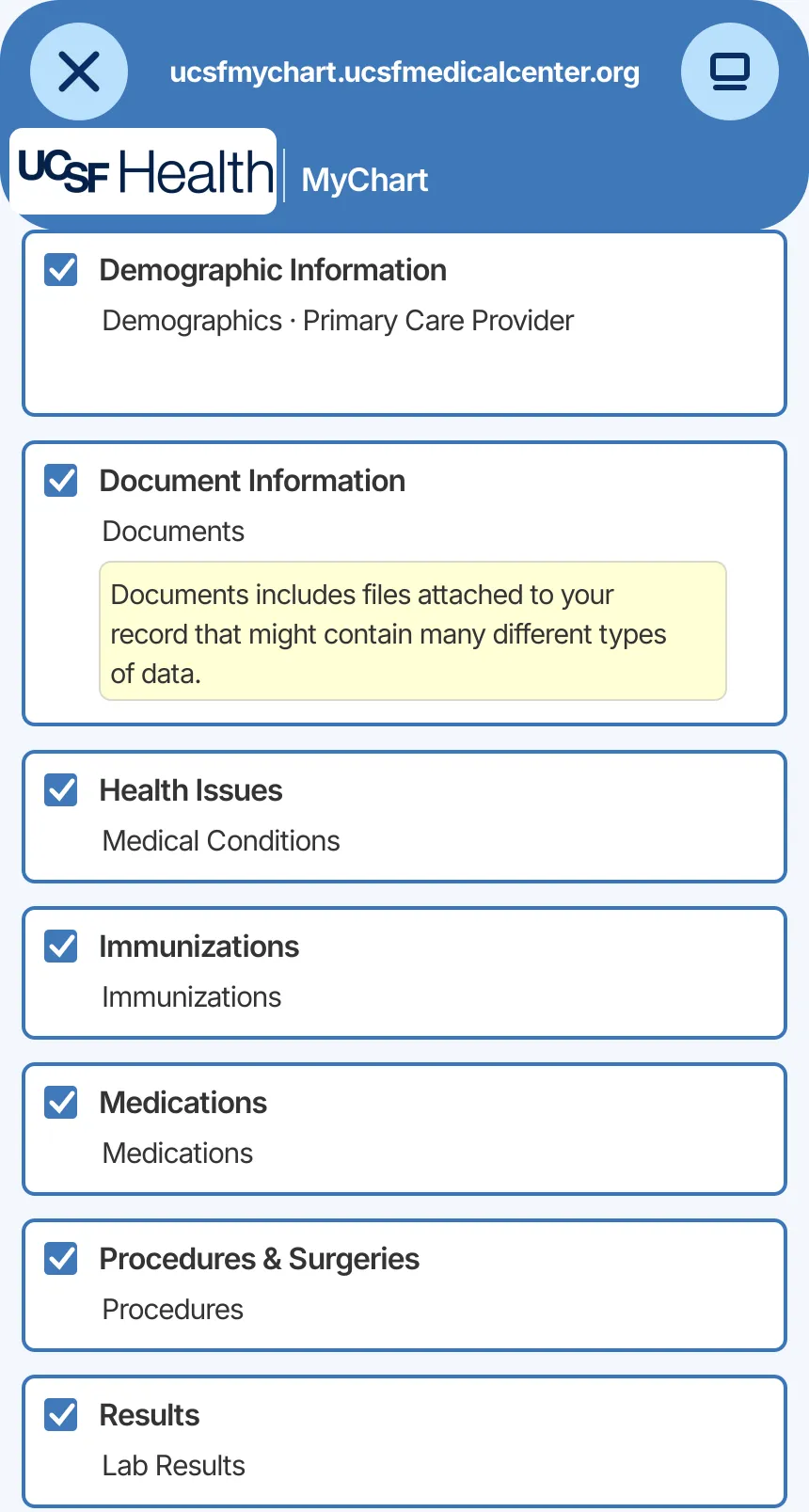
    Select the information you want to organize. Actual availability depends on your account.

    Illustrative example: Epic MyChart record categories available to choose for the UCSF Health connection
    Health-information categories selected for import.
  5. Step 5 of 7

    Import available records

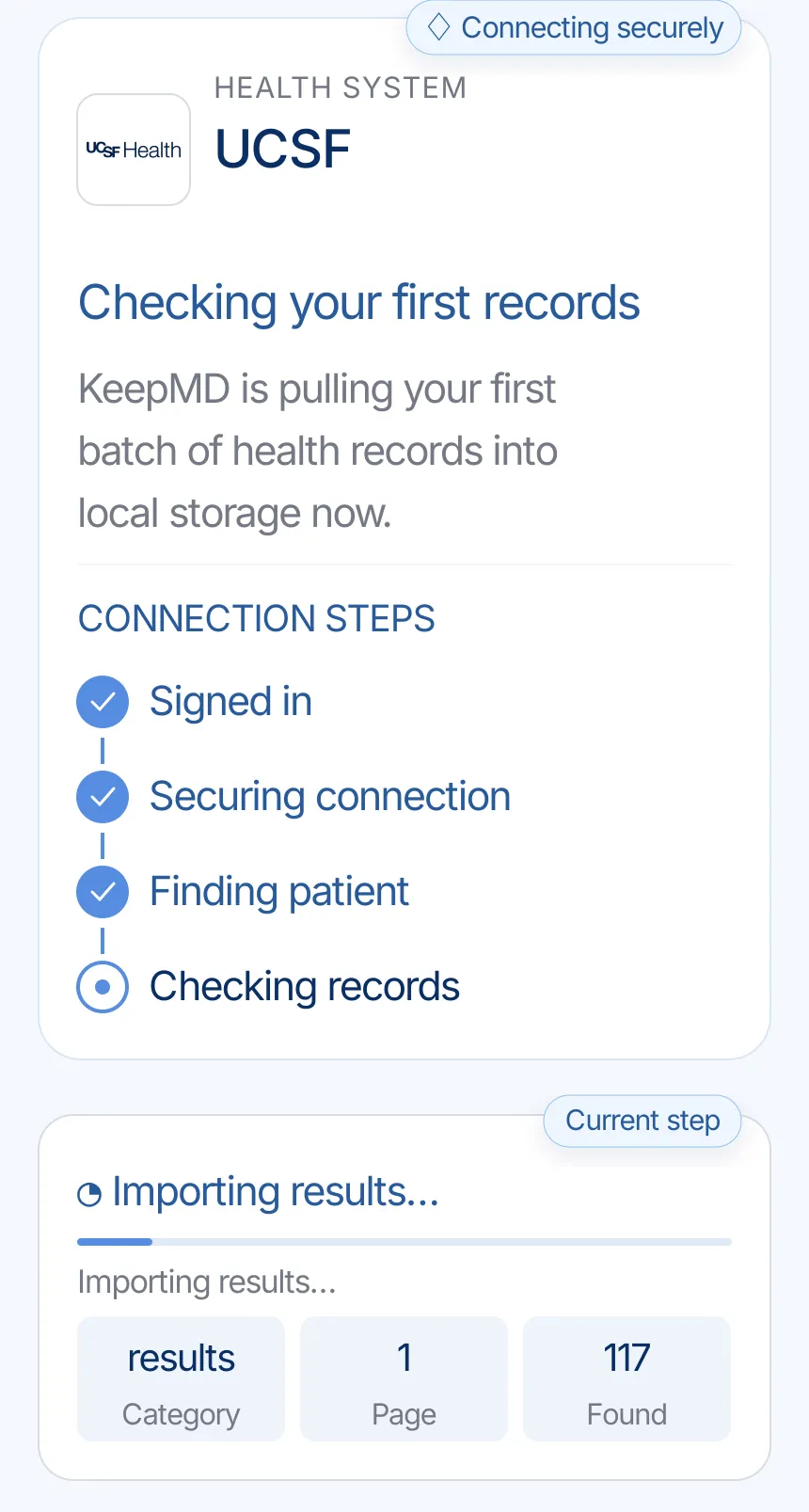
    KeepMD secures the connection and checks the information the provider makes available.

    Illustrative example: KeepMD checking the first records from UCSF
    KeepMD checking available records.
  6. Step 6 of 7

    Review organized records

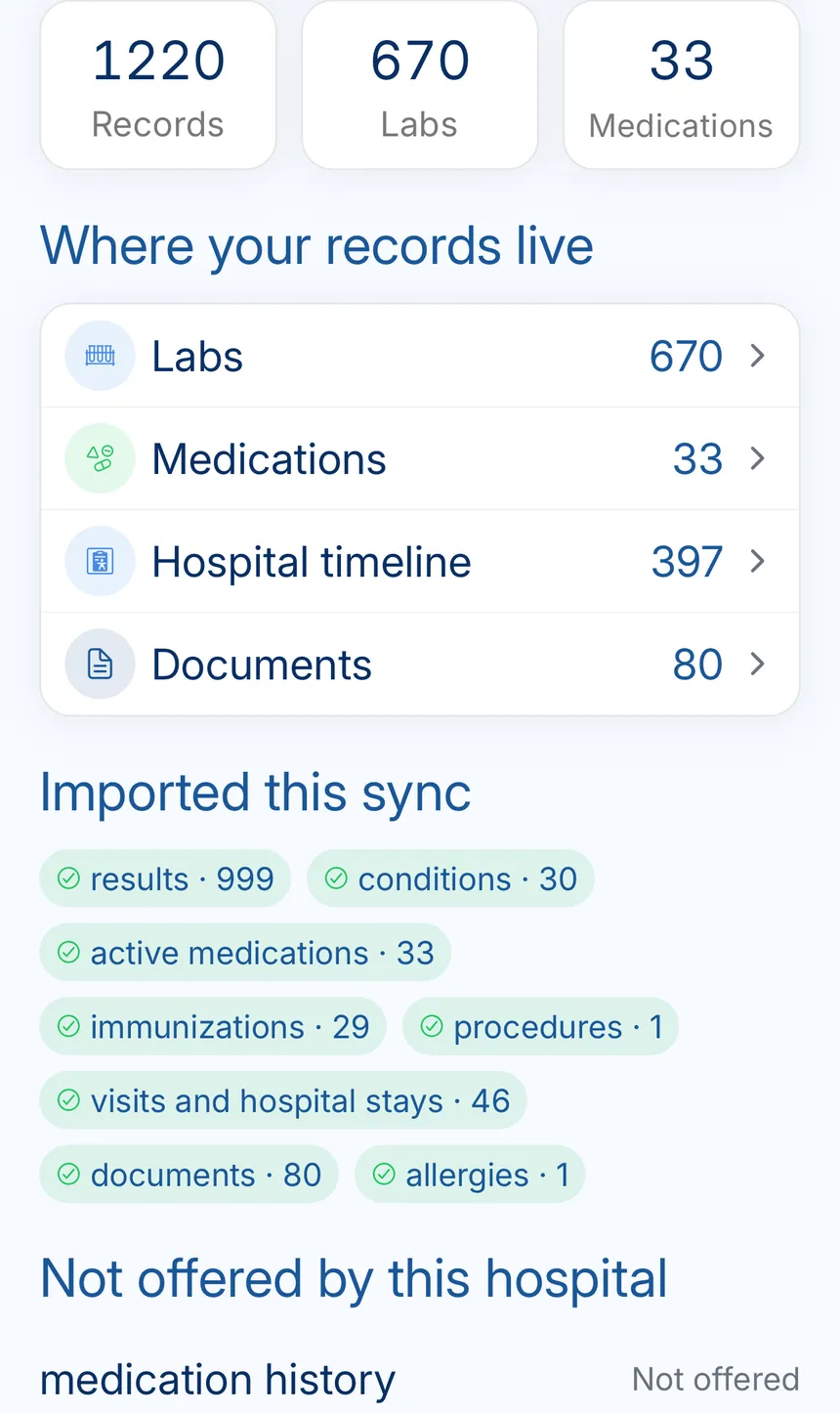
    KeepMD groups what the connection returns. Categories and totals can vary.

    Illustrative example: KeepMD record summary showing organized labs, medications, timeline events, and documents
    Provider records organized in KeepMD.
  7. Step 7 of 7

    See the connection summary

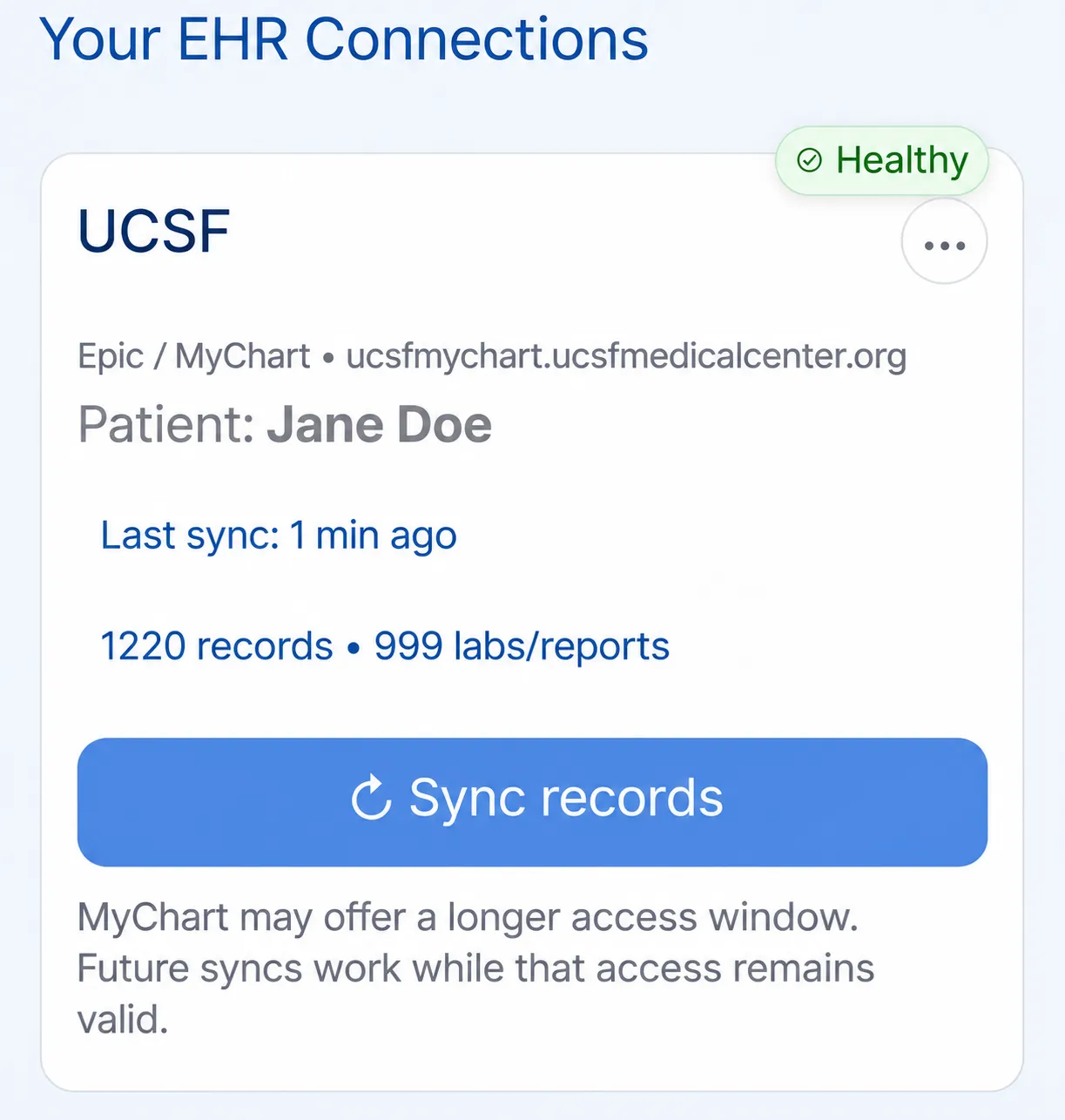
    The summary keeps the provider, last update, and organized categories together.

    Illustrative example: healthy UCSF connection in KeepMD with a recent sync and Sync records control
    UCSF Health connection summary in KeepMD.

UCSF Health: access and requests

Everything the connection does not cover: identifying the right organization, portal downloads, formal requests, privacy, and the post-import check.

Identify your portal and treating location

Health system
UCSF Health
Patient portal
UCSF (ucsfmychart.ucsfmedicalcenter.org)
Platform
Epic MyChart
Also appears as
  • UCSF
  • UCSF Health
  • UCSF Medical Center
  • UCSF MyChart
  • UCSF Benioff Children's Hospitals
  • UCSF Health Hyde Hospital
  • UCSF Health Stanyan Hospital

UCSF MyChart is the patient portal for UCSF Health, including UCSF Benioff Children's Hospitals in San Francisco and Oakland and, since October 4, 2025, UCSF Health Hyde Hospital and UCSF Health Stanyan Hospital, formerly Saint Francis and St. Mary's. In KeepMD, search for UCSF and confirm the portal domain is ucsfmychart.ucsfmedicalcenter.org before authorizing. MarinHealth also links its patients to this portal but lists its own records offices. John Muir Health and Zuckerberg San Francisco General publish their own portals, and UCSF student health uses MyHealthRecord.

Review and download your documents

UCSF says most records are already in MyChart without a special request, and most clinical notes appear under Visits. For anything else, go to Menu, Sharing Hub, Yourself, then Request a copy. If you do not use MyChart, mail the health information release form, its Spanish version, Autorización de divulgación de información médica, or a signed letter with your medical record or unit number and your full name at the time of treatment to 400 Parnassus Ave., Room A88, San Francisco, CA 94143-0308. UCSF says it processes requests within 15 days and charges 25¢ per page for copies or $25 for an electronic record, calling you with the total.

Request the right records

The records page lists Parnassus as the general office and names no separate Mission Bay or Mount Zion office; you may pick up records in person or book a time to review them. Children's requests follow the place of treatment: San Francisco uses Parnassus, where the children's page also lists fax 415-353-4839, and Oakland uses 747 52nd St., Oakland, CA 94609, phone 510-428-3730, fax 510-658-1923. For psychiatric records, contact UCSF Langley Porter Psychiatric Hospital, 415-353-2336, about inpatient care and outpatient care before June 27, 2022, and the UCSF Nancy Friend Pritzker Psychiatry Building about later outpatient care. The form releases drug and alcohol, mental health, HIV and genetic test information only if you mark those boxes.

Records 415-353-2221 Health Information Management Services

Review access before authorizing

Authorize through UCSF Health's official portal and confirm the patient. Follow the hospital's proxy permissions when helping a relative.

Keep passwords and sign-in codes private. To stop future app access, check the portal's connected-app controls. Removing permission does not automatically delete files already downloaded or shared. KeepMD is independent of UCSF Health and Epic. The screens are examples with synthetic values, not evidence of a hospital-specific import.

Review imported records and permissions

After the first import, compare one UCSF visit, its date and the record categories with MyChart. UCSF notes that third-party app data may differ from MyChart, and you can revoke apps under Manage My Linked Apps and Devices. UCSF describes affiliates as independent providers, so keep them on a separate checklist; at the Berkeley Outpatient Center, jointly operated with John Muir Health, or a UCSF-John Muir Health cancer site, ask the clinic which portal holds your visit. A missing document can reflect portal scope, an unfinished request or a different custodian. Corrections go in writing to Patient Relations, 415-353-1936, or Oakland Health Information Management; a second KeepMD sync cannot change the source record.

Known UCSF Health quirks worth checking

The visit is missing

If a visit is missing, check the site and date first. UCSF says Hyde and Stanyan records moved into its system, so look in MyChart; each hospital's page still points care before October 4, 2025 to its own office, Hyde at 415-353-6310 and Stanyan at 415-750-5767. Health Information Management Services answers at 415-353-2221, Monday to Friday, 8 a.m. to 4:30 p.m. Parents of a child 11 or younger request Proxy Center access; patients 12 to 17 must approve it, and sensitive services stay hidden from parents. Representatives of adults use the MyChart page's proxy forms. The records page prints no steps for a deceased patient, so ask the office. KeepMD does not decide who may access a UCSF chart.


You need original images

UCSF says the report and images from your exam are available in MyChart, and its radiology department describes viewing and downloading them there. The Radiology Imaging Library also provides them on CD, free of charge: send the release form with the exam type, exam date and mailing address by email, or by fax to 415-353-8583, and the CD is mailed five to seven business days after the form arrives. Call 415-353-1640, option 3, from 7 a.m. to 6 p.m. any day. Oakland families contact Oakland radiology at 510-428-2010 and collect the CD in person. Images visible in MyChart are not proof that they arrive in KeepMD.

FAQ

UCSF Health records questions

Sources